Claude Code for Fullstack Development: The 3 Things You Actually Need

TL;DR
Claude Code for fullstack development doesn't require complex workflows. Three essentials are all you need:
- full-stack debugging visibility via background tasks and browser automation tools like Chrome DevTools MCP,
- LLM-friendly documentation access via llms.txt (10x more context-efficient than MCP servers), and
- an opinionated fullstack framework like Wasp that reduces boilerplate by 60-80% so AI can build more complex apps with greater accuracy.
How Can I Use Claude Code Effectively?
There's a lot of hype around vibe coding with Claude Code.
The good news is that it's warranted. Claude Code can take care of some surprisingly complex coding tasks.
The bad news is that it's over-hyped, with claims of amazing apps being vibe coded in a couple hours, or complex workflows that use 10 parallel sub-agents running in a loop to replace the work of 5 software engineers.
If you're not already a Claude Code power user, all this hype can leave you questioning how to use it effectively. Am I missing out on productivity gains by not adopting this insane new workflow? Should I be using subagents, commands, skills, or MCP servers for my use case? If so, how?
I was asking myself these exact questions, so I did a good few weeks of research and testing, and reached the following conclusion:
With just a few well-picked tools, and Claude Code's basic features, you have enough to "vibe code" great full-stack apps.
You Don't Need All its Features
Weird seeing all these complex LLM workflows and tools. Meanwhile I run one continuous Claude convo per project... I've never used a subagent. Never used MCP… And I have wildly good results ¯_(ツ)_/¯
— Chris McCord, creator of the Phoenix framework
While Claude Code's abilities are impressive, you quickly realize that there is a lot of feature overlap and stuff you just generally won't have to touch often if you get a few things right from the start. I'll explain what these are, and then go into more detail on each topic within this article.
1. Provide it with full-stack debugging visibility
- This allows Claude to actually see and respond to what it's coding, rather than us having to copy-paste errors, or describe issues.
2. Give Claude Code access to up-to-date, LLM-friendly documentation
- This is crucial when working with LLMs that may have outdated knowledge, hallucinate solutions, or get thrown off by "noisy" documentation that's not optimized for LLMs.
3. Use the right tech stack or framework
- This is probably the most overlooked of these three approaches. By picking the right framework, you give AI clear patterns to follow, and remove a lot of complexity right from the start.
With this foundation, you'll be able to build and deploy fullstack apps easily by mostly using Claude Code's default workflows, and just a couple custom commands/skills (I also packed these ideas into a simple Claude Code plugin you can install and use, but I'll talk more about that later).
This approach works because it provides guardrails and the right patterns for the agent to follow, so you can spend more time on business logic implementation, and less time working out specifications and technical details.
Essentially, you get to work with the agent on what you want, rather than having to explain how you want it, bringing that magic feeling of AI-assisted coding to complex, full-stack apps.
Let's dive in.
Giving Claude Code Full-Stack Vision
Establishing a Tight Feedback Loop
Our typical AI-assisted coding workflow tends to look like this: we prompt, then wait, then look over the generated code (maybe), then check on things in the browser. If we've got some errors or some bad looking frontend designs, we copy and paste them and try to (better) explain what we want.
What's worse is we might have to do this a few times before we're satisfied, or get things working again.
By always keeping ourselves in the loop, we're slowing things down a lot. We should, at times, just get out of the way and let the agent improve the code with each iteration until its done, before checking the result.
But to do this, we need to give Claude Code a "set of eyes". Luckily, this is possible with the right features and tools, allowing it to see the results of the code it wrote, and quickly modify it autonomously if it encounters an error anywhere in the stack.
Let's check out how.
Running the Dev Server as a Background Task
Claude Code introduced their background tasks feature which lets it execute long-running tasks, like app development servers (e.g. npm run dev), on the side without blocking Claude's progress on other work. The nice part is that Claude can continue to read and respond to the output of this task while you work.
To run commands in the background, you can either:
- Prompt Claude Code to run a command in the background, e.g.
"run my app's dev server in the background" - Press Ctrl+B to move a regular Bash tool invocation to the background, e.g.
"run the dev server"+Ctrl+bas it starts
Even though Claude can read the output of your background tasks, there are times you may want to check up on them yourself, and you still can do that. Just use the down arrow to highlight the background task message and click enter.
This is great because now Claude can react to issues that occur from building and serving your code. Unfortunately, it still can't react to errors that occur while your app is running in the browser.
But there's a cool way to solve this.
Browser Automation Tools
The missing piece so far is giving Claude the ability to actually see the result of the code it wrote, most typically what the UI looks like.
Problems that only show up after the app is running in the browser, like design issues and runtime errors, aren't yet visible to the agent. So this tends to be where the human steps in to report back to: "the button is misaligned", "there's a 404 error when trying to login", "the console says something about undefined".
But luckily, we can arm Claude Code with browser automation tools to solve for this. These tools allow for programmatic control of the browser, like loading pages, clicking buttons, inspecting elements, reading console logs, and even taking screenshots.
This closes the loop for the entire stack and gives Claude the autonomy to complete larger features tasks entirely on its own.
Chrome DevTools MCP server is one of the best options currently out there, though there are many alternatives. It's easy to install, and specializes in browser debugging and performance insights.
To install it, run the following command in the terminal to add it to your current project:
claude mcp add chrome-devtools --scope project npx chrome-devtools-mcp@latest
Then start a new Claude session and give it a prompt like:
Verify in the browser that your change works as expected.
You should see a separate Chrome instance open up being controlled by Claude. Go ahead and give it more tasks like:
- authenticating a test user
- checking the lighthouse performance score of a site (e.g. how fast it loads)
- giving you feedback on how to improve your app's design
Tying it All Together
Now, when you're implementing full-stack features in your app, ask Claude to verify the feature works correctly by checking the logs in the development server, as well as in the browser with the Chrome DevTools MCP.
Alternatively, if you want Claude to always automatically verify changes in the browser with the DevTools MCP without having to explicitly ask it to do so, you can add a rule to Claude's memory in your CLAUDE.md file.
Give the Agent Access to the Right Docs
The Versioning Problem
You've probably experienced this: you're vibe coding using a library's API, and the AI confidently writes code that would have worked perfectly… two versions ago. Or it creates some crazy, over-engineered work-around to a known issue that has a simple solution in its documentation.
This is because the model's training data has a cut-off date. LLMs and tools like Claude have no way of knowing about the updated code patterns, unless you give it access to the current documentation.
But, as Andrej Karpathy observed, most documentation contains content that's not relevant for LLMs:
99% of libraries still have docs that basically render to some pretty .html static pages assuming a human will click through them. In 2025 the docs should be a your_project.md text file that is intended to go into the context window of an LLM.
There's research to back up his claim, showing that LLM performance degrades when irrelevant content, like HTML syntax or verbose instructions for humans, is added to context as it distracts from the task and reduces accuracy.
In other words, every unnecessary token in your context window makes the AI slightly worse at its job.
So we need to be giving Claude Code the right kind of docs.
The Solution: Curated Doc Access
The fix is simple: give the agent the ability to fetch and read the relevant, LLM-optimized documentation for the tools you're using.
Here are the two main ways developers are accomplishing this:
- MCP Servers — A standard for external systems to serve data to AI agents. Popular dev tools, such as Vercel, make these available with doc searching tools.
- llms.txt and doc maps — A standard for publishing LLM-friendly documentation at a well-known URL, e.g. https://wasp.sh/llms.txt. The agent fetches structured docs optimized for LLM context windows.
MCP Servers for Docs Fetching
The Model Context Protocol (MCP) is an open standard for connecting AI applications (i.e. agents, LLMs) to external systems. Claude Code can communicate with an MCP server to access specialized tools and information.
There are already tons of MCP servers for popular tools, like Supabase, Jira, Canva, Notion, and Vercel. Claude Code has a docs section listing these and many more, with instructions on how to install them if you’re interested.
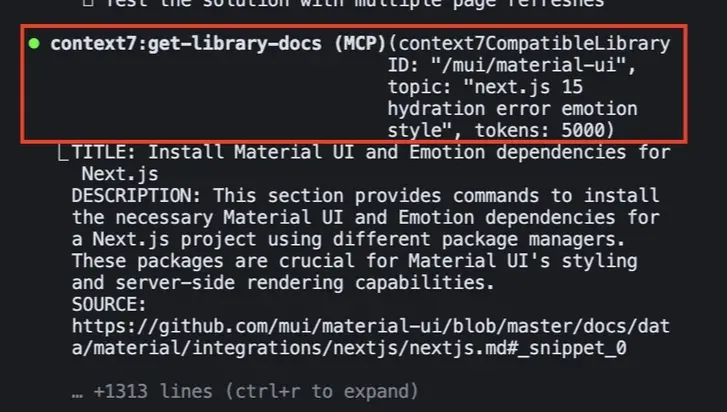
Developer Tool MCP servers like Supabase and Vercel have tools which will fetch documentation for the agent based on a query. There are some pros and cons to this approach, though.
Pros
- can do some pre-processing on the docs before sending them back
- can version-check, filter, and fetch relevant snippets across multiple docs/guides
- return structured outputs instead of raw text
Cons
- the MCP server decides what is relevant, ignoring potentially useful information
- all of its tools (not just doc fetching tools) get loaded into, and quickly fill up, the LLM’s context window, degrading the agent’s performance
- more overhead for the agent: evaluate prompt → find the right MCP tool → call it → wait for response from MCP server → evaluate response → take action
Because LLMs don’t have a real memory, they have to load information into context with every new session, such as the tools they can use. A single MCP server can add around 15-30 tools to the context, and with multiple servers you can easily consume 10-20% or more of your LLM’s context window before you even begin working.
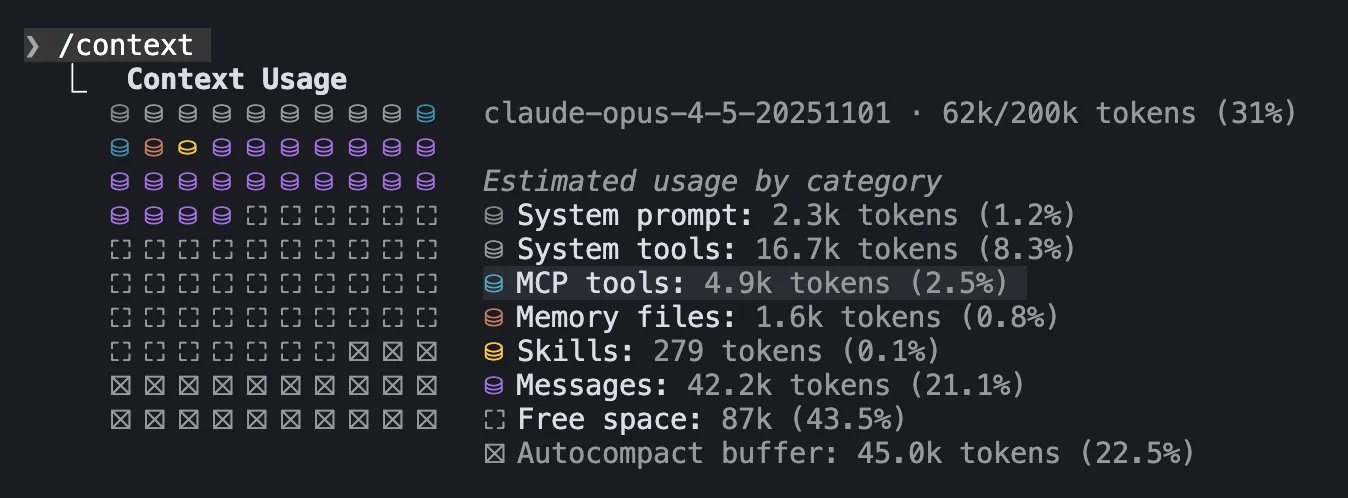
If you want to see how much of your context window is already used up, you can run the /context slash command in an active Claude Code session.
The example above shows that 2.5% of the context window is used up by just one MCP server.
And as an LLM’s context window fills up, it’s performance degrades. Some devs even suggest starting a new session once the context is 75% full to avoid this, which is possible with the /clear command in Claude Code. You can also run the /compact command which creates a summary of your current session’s context and passes it along to the next session.
Luckily, if your main reason for using an MCP server is just for documentation searching, then an alternative open standard exists that may be a better fit.
LLM-friendly Docs URLs — LLMs.txt
LLMs.txt has quickly become the standard for providing LLMs with context-friendly versions of websites at an /llms.txt path.
Try it out on some of your favorite developer tools URLs, such as:
Although llms.txt files might vary widely in the content they surface, they always follow the same format of a simple markdown file with the title of the website and some links. That’s it! This allows LLMs to get precise information without all the fluff.
Here are some of the pros and cons of using llms.txt for documentation fetching:
Pros
- curated list of the most relevant information for LLMs and agents
- extremely simple; works with any agent that can fetch URLs
- agents decide which links to follow and can see full source text
- very context window efficient
Cons
- raw docs / markdown files may transmit more information than needed
- the agent could fetch incompatible links / files
- the agent might need more guidance / rules on how to interact with the docs correctly
In my opinion, I think that fetching docs via an llms.txt URL is the better approach as its more context efficient. For example, a typical documentation file is ~100 tokens versus 5,000-10,000 tokens for just one MCP server.
That’s a 10x reduction in context usage.
Claude Code is also great at navigating documentation maps to only fetch the most relevant information. Plus, you get the added benefit that llms.txt files are easier for humans to reference as well.
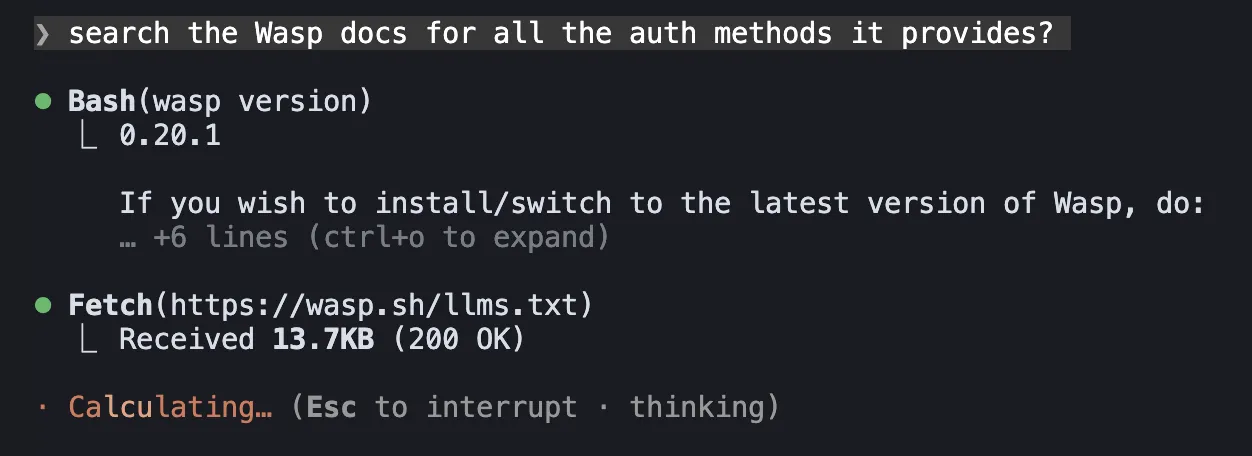
It's also the method that Claude Code uses for its own doc fetching internally. So when you ask it a question about its own features, it will first fetch its documentation map markdown file URL to find the correct guides.
So now that you know how to give Claude Code access to up-to-date documenation, the next question to answer is which tools might you need to provide the docs for?
And the most obvious answer is the tech stack or framework you’re building your full-stack app with.
Choosing the Right Tech Stack / Framework
Popular Choices
This is probably the most overlooked of the 3 pillars.
Starting with a tech stack that AI can easily reason about will make the job of building the app you want significantly easier. There are a lot of options out there, but luckily there are many solid choices, such as:
- NextJS (React, NodeJS)
- Laravel (PHP)
- Ruby on Rails (Rails)
- Wasp (React, NodeJS, Prisma)
In 2026, you'll be able to get very far with Claude Code and any of the frameworks listed above. But while these frameworks all offer good conventions, and are responsible for stitching together the most important parts of the stack, most of these still require some sort of additional integration.
Which one should you go with?
For NextJS, which is more client-side focused, you have to chose and connect your own database layer. For Laravel and Rails, which unify backend and database, you need to decide which client to use and how it will talk to your backend.
That's why a lot of developers will reach for popular stacks/combos that include these frameworks, such as:
- NextJS + tRPC + Prisma + NextAuth (aka T3 Stack)
- Laravel + Inertia.js + React
- Rails + Hotwire
You might have noticed as well that the T3 Stack is the only one to include an authentication library, NextAuth. That's because the backend-focused frameworks, Laravel and Rails, have an opinionated way of adding authentication to your app already, but NextJS does not.
Wasp, on the other hand, is the only one of the bunch that unifies all parts of the stack — client ↔ backend ↔ database — while also being opinionated on features.
This is all great, but which one should you ultimately choose?
The More Opinionated, The Better
Well, the more opinionated the framework, the better it vibes with AI.
If a framework is opinionated, it means there's usually one obvious place to put code and one common pattern to follow. The AI doesn't have to guess. They've already made decisions ahead of time so you (and your agent) don't have to. They've encoded architectural wisdom into conventions, picked the libraries to use, the way authentication is wired, and how the app should be structured.
So when there are fewer decisions to make, less boilerplate to write, and fewer tools to stitch together, the development process becomes more reliable.
And as the app gets more complex, AI doesn't lose its focus, because the framework is handling a lot of underlying complexity. You can also understand and inspect what is being generated more easily, and avoid building yourself into a messy corner.
Consider that opinionated frameworks can reduce boilerplate by 60-80%. Wasp's auth declaration, for example, replaces 500+ lines of typical authentication code with a 10 to 15-line config. That's 97% less code that needs to be generated and audited!
Of these frameworks, Wasp is definitely the most opinionated but it's also the newest kid on the block. After that, Laravel and Rails are probably tied for a close second, but they are built on PHP and Rails, respectively, and come with their own distinct ecosystems, so you'll most likely have to pair them with a frontend JavaScript framework like React, too. NextJS, is the most popular but least opinionated of the bunch, so it means there is more complexity and up-front choices you and your AI have to deal with, but this offers more flexibility in the long run.
So in the end, the choice you make largely depends on what you're trying to achieve, what you're comfortable with, and how much flexibility you need.
Just remember, the more a framework gives you structure and defaults, the easier it is for AI to generate code that fits correctly — and the less time you spend fixing confusing or inconsistent output.
What This Means for Claude Code
Ok. So we've established that working with an opinionated framework means that it it manages a lot of the complexity for you.
But what does that practically mean when using it with Claude Code?
- Subagents for architecture planning? The framework already decided the architecture.
- Elaborate plans for where code should live? The conventions tell you.
- Back-and-forth to agree on patterns? The patterns are already decided.
- Glueing the pieces of your app together? The frameworks manage this code.
- Context that explains your app structure? It's embedded in the framework.
In a sense, the framework acts as a large specification that both you and Claude already understand and agree on.
Instead of multi-turn conversations to figure out HOW things should be built, you get to just say WHAT you want built.
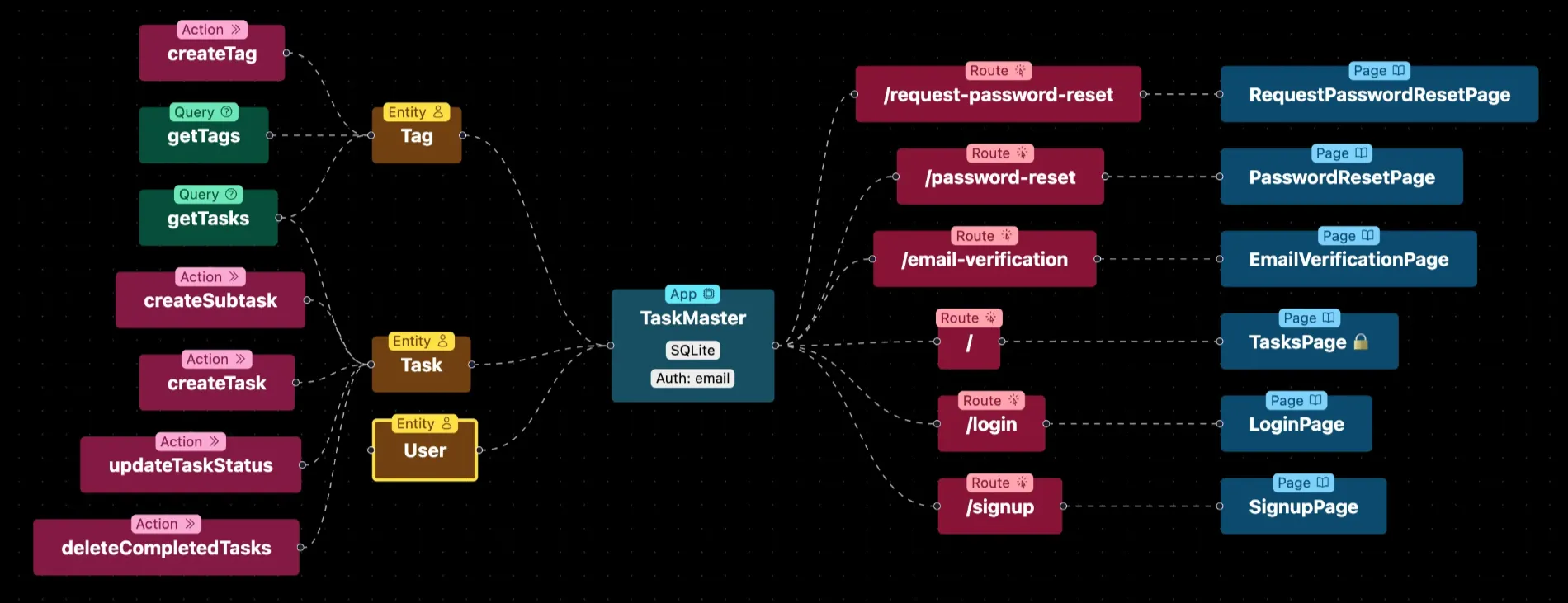
So when you tell Claude "add a new model for Comments" or "add a user account settings feature", Claude will know exactly what that means and where it all goes. And you also get the added benefit that the implementations follow best practices and are backed by the decisions of experienced professionals behind the framework, and is not just some LLM hastily implementing a feature on the wrong assumptions.
This isn't to say that you no longer have to do good planning, create a good spec, or Product Requirement Doc for your agent to follow. This can still be a really important step when vibe coding (or practicing "spec-driven development").
But it does mean that, with an opinionated full-stack framework, much less of your planning phases need to be devoted to discussing architectural and technical implementation details.
This Approach, In a Plugin
If you want to put this theoretical approach I discussed above to the practical test, then I suggest you try out the Wasp plugin we created for Claude Code.
We, the Wasp framework creators, maintain the plugin, so we've battle tested it with Wasp. Plus we're a very responsive community and we're listening to feedback and improving it all the time.
Here's how to get started:
- Install Wasp
npm i -g @wasp.sh/wasp-cli
- Install the Claude Code plugin
# add the Wasp marketplace to Claude
claude plugin marketplace add wasp-lang/wasp-agent-plugins

# install the plugin from the marketplace
claude plugin install wasp@wasp-agent-plugins --scope project
- Start a new Wasp project
# create a new project
wasp new

# change into the project root directory
cd <your-wasp-project>
- Start a Claude Code session in your Wasp project directory
claude
- Run the init command to set up the plugin
/wasp:init
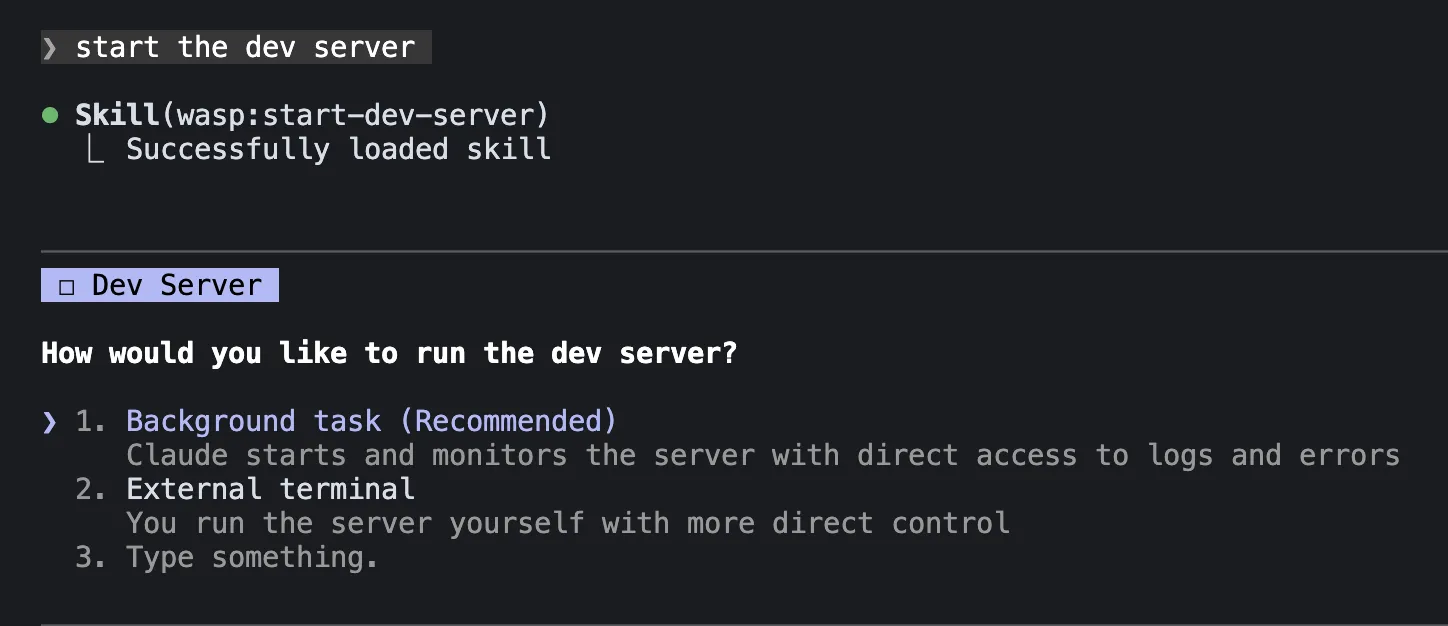
From there, you can tell Claude to "start the dev server" and it will walk you through spinning up fullstack visibility as we outlined above. Or ask it to implement a Wasp feature and watch it fetch version-matched documentation guides for you!
More importantly, Wasp as a framework pushes into territory that's even more AI-native than the rest, because of its central configuration file(s) where the app is defined.
This main config file is like your app's blueprint. Wasp takes these declarations, and manages the code for those features for you.
Take this example config file authentication snippet as reference:
app TaskManager {
  wasp: { version: "^0.21.0" },
  title: "Task Manager",
  auth: {
    userEntity: User,
    methods: {
      email: {},
      google: {}
    },
    onAuthFailedRedirectTo: "/login"
  }
}
This is what an authentication implementation in Wasp looks like. That's it.
This 8-line config generates what would typically require 500-800 lines of code: components, session handling, password hashing, OAuth flows, and database schemas. Claude just needs to know what auth methods you want.
Claude doesn't need to worry about choosing what kind of auth implementation to use, or generating any of the glue code. It can just get straight to work building features.
When You DO Need the Fancy Stuff
I've spent this whole article arguing that you can ignore a lot Claude Code features for fullstack app development. But I don't want to leave you with the impression that those features are useless.
Custom subagents, commands, and skills shine when you're doing the same task repeatedly with consistent criteria, e.g.:
- Testing — A dedicated test-runner subagent that knows your testing patterns, runs suites, analyzes failures, and suggests fixes.
- Code Reviews — A code review command or subagent that runs tests, fixes bugs, and reviews code after every development.
- Running Scripts — Skills can be useful if you have deterministic tasks you run often, like a deployment script or using a cli tool to convert your blog images to webp. Define them in a Skill and link those scripts to them, and Claude Code will run them when it deems it fit for the task at hand.
These are tasks where you want the same process followed every time and where a well-configured subagent with specific rules makes sense.
In most cases, reach for complexity only when the simpler approach stops working.
Now Build!
With these three ingredients I think most fullstack app developers can get the vast majority of the work done without reaching for much more:
- An opinionated framework that handles architecture/boilerplate so Claude doesn't have to
- Version-matched documentation so Claude has up-to-date implementation details
- Full-stack visibility so Claude can see what's happening and fix it on its own
With these in place, Claude Code's basic toolset—exploring, planning, reading, writing, running commands—is enough to build real, complex fullstack applications. The subagents, hooks, plugins, and complex configurations are there if you need them, but honestly most of the time, you won't.