> Fetch the complete documentation index at: https://wasp.sh/llms.txt
---
# Auth Hooks
Auth hooks allow you to "hook into" the auth process at various stages and run your custom code. For example, if you want to forbid certain emails from signing up, or if you wish to send a welcome email to the user after they sign up, auth hooks are the way to go.
## Supported hooks
The following auth hooks are available in Wasp:
- [`onBeforeSignup`](#executing-code-before-the-user-signs-up)
- [`onAfterSignup`](#executing-code-after-the-user-signs-up)
- [`onAfterEmailVerified`](#executing-code-after-a-user-verifies-their-email)
- [`onBeforeOAuthRedirect`](#executing-code-before-the-oauth-redirect)
- [`onBeforeLogin`](#executing-code-before-the-user-logs-in)
- [`onAfterLogin`](#executing-code-after-the-user-logs-in)
We'll go through each of these hooks in detail. But first, let's see how the hooks fit into the auth flows:
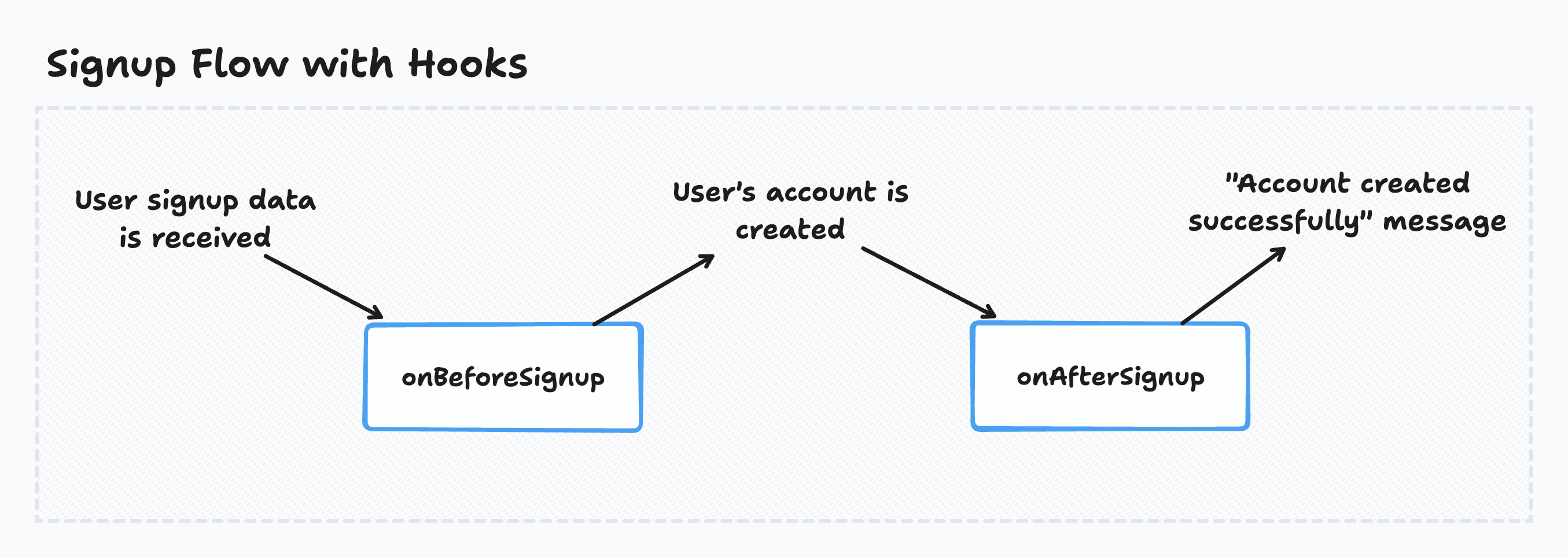
Signup Flow with Hooks
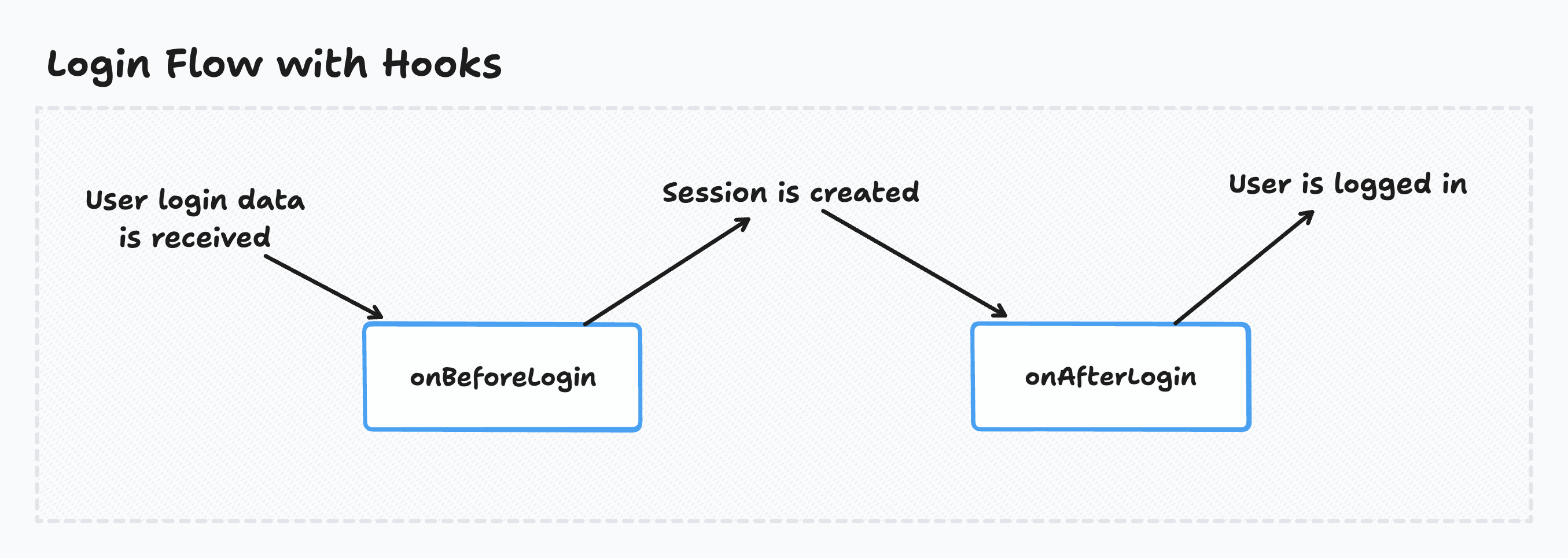
Login Flow with Hooks \*
\* When using the OAuth auth providers, the login hooks are both called before the session is created but the session is created quickly afterward, so it shouldn't make any difference in practice.
Users registering with [email](https://wasp.sh/docs/auth/email) must verify it before they can log in. This verification triggers the Email verification flow:
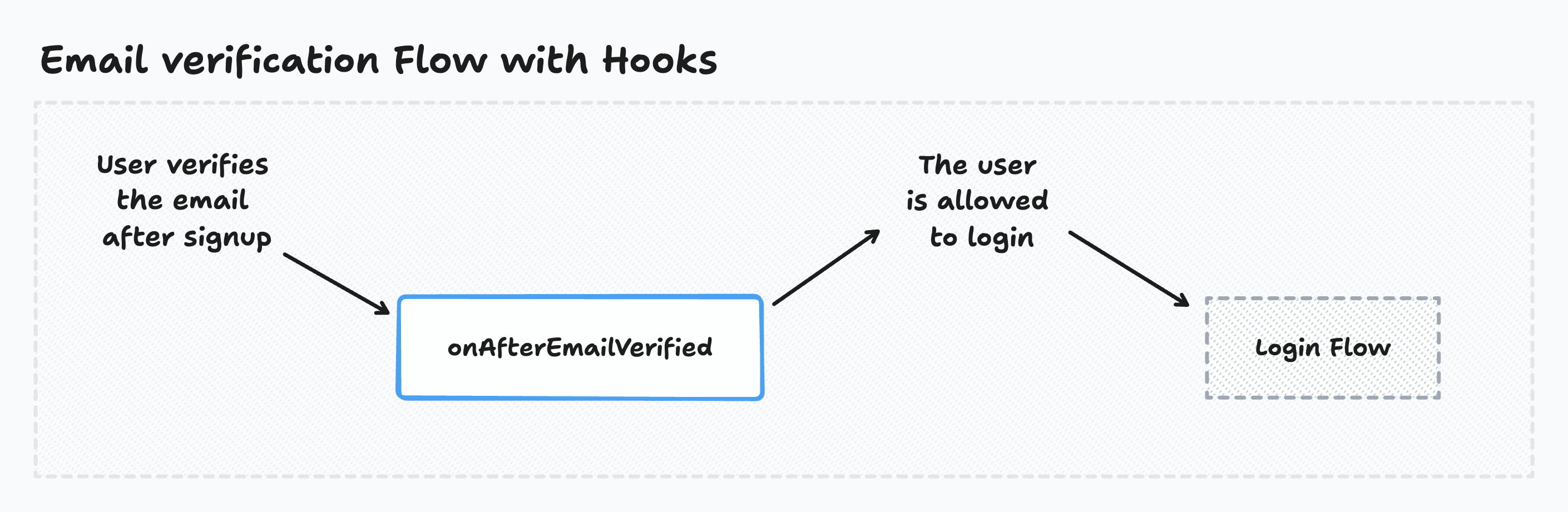
Email Verification Flow with Hooks
Users signing in with [OAuth](https://wasp.sh/docs/auth/social-auth/overview) must authorize access before completing login. This authorization triggers the OAuth consent flow:
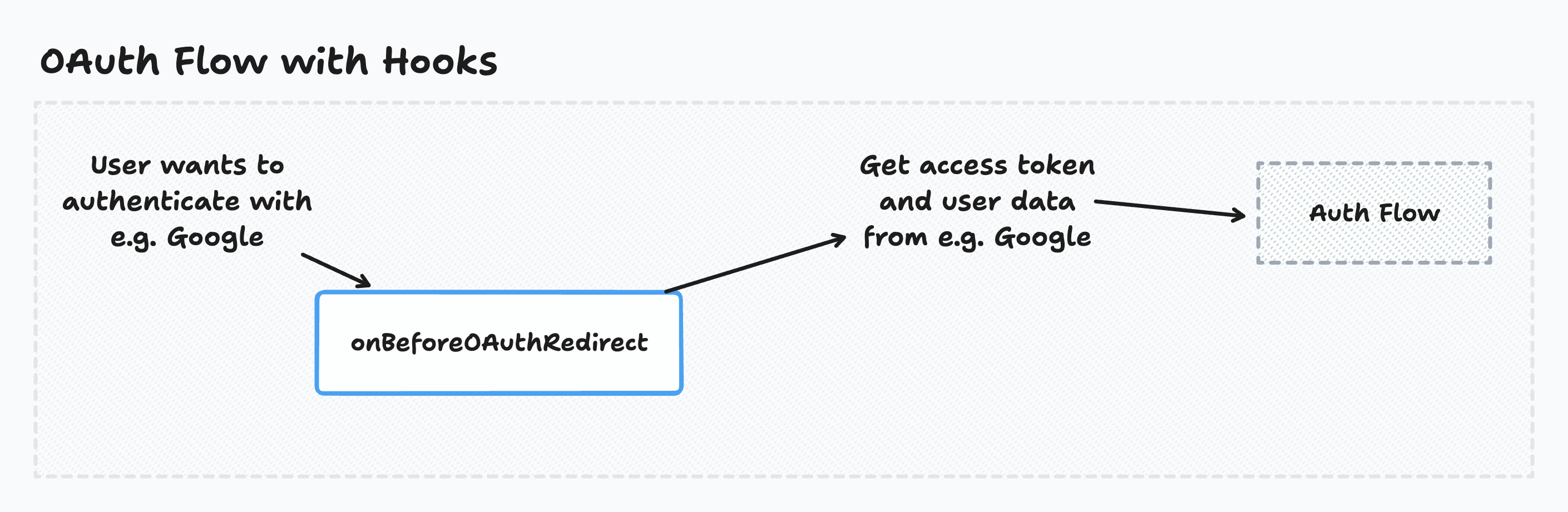
OAuth Flow with Hooks
## Using hooks
To use auth hooks, you must first declare them in the Wasp file:
```ts title="main.wasp.ts"
import { app } from "@wasp.sh/spec"
import {
onBeforeSignup,
onAfterSignup,
onAfterEmailVerified,
onBeforeOAuthRedirect,
onBeforeLogin,
onAfterLogin,
} from "./src/auth/hooks" with { type: "ref" }
export default app({
name: "myApp",
wasp: { version: "^0.25" },
title: "My App",
head: [""],
auth: {
userEntity: "User",
methods: {
// ...
},
onBeforeSignup,
onAfterSignup,
onAfterEmailVerified,
onBeforeOAuthRedirect,
onBeforeLogin,
onAfterLogin,
},
// ...
})
```
If the hooks are defined as async functions, Wasp *awaits* them. This means the auth process waits for the hooks to finish before continuing.
Wasp ignores the hooks' return values. The only exception is the `onBeforeOAuthRedirect` hook, whose return value affects the OAuth redirect URL.
We'll now go through each of the available hooks.
### Executing code before the user signs up
Wasp calls the `onBeforeSignup` hook before the user is created.
The `onBeforeSignup` hook can be useful if you want to reject a user based on some criteria before they sign up.
Works with [Email](https://wasp.sh/docs/auth/email) [Username & Password](https://wasp.sh/docs/auth/username-and-pass) [Slack](https://wasp.sh/docs/auth/social-auth/slack) [Discord](https://wasp.sh/docs/auth/social-auth/discord) [Github](https://wasp.sh/docs/auth/social-auth/github) [Google](https://wasp.sh/docs/auth/social-auth/google) [Keycloak](https://wasp.sh/docs/auth/social-auth/keycloak)
```ts title="main.wasp.ts"
import { app } from "@wasp.sh/spec"
import { onBeforeSignup } from "./src/auth/hooks" with { type: "ref" }
export default app({
// ...
auth: {
// ...
onBeforeSignup,
},
// ...
})
```
```ts title="src/auth/hooks.ts"
import { HttpError } from "wasp/server"
import type { OnBeforeSignupHook } from "wasp/server/auth"
export const onBeforeSignup: OnBeforeSignupHook = async ({
providerId,
prisma,
req,
}) => {
const count = await prisma.user.count()
console.log("number of users before", count)
console.log("provider name", providerId.providerName)
console.log("provider user ID", providerId.providerUserId)
if (count > 100) {
throw new HttpError(403, "Too many users")
}
if (
providerId.providerName === "email" &&
providerId.providerUserId === "some@email.com"
) {
throw new HttpError(403, "This email is not allowed")
}
}
```
Read more about the data the `onBeforeSignup` hook receives in the [API Reference](#the-onbeforesignup-hook).
### Executing code after the user signs up
Wasp calls the `onAfterSignup` hook after the user is created.
The `onAfterSignup` hook can be useful if you want to send the user a welcome email or perform some other action after the user signs up like syncing the user with a third-party service.
Since the `onAfterSignup` hook receives the OAuth tokens, you can use this hook to store the OAuth access token and/or [refresh token](#refreshing-the-oauth-access-token) in your database.
Works with [Email](https://wasp.sh/docs/auth/email) [Username & Password](https://wasp.sh/docs/auth/username-and-pass) [Slack](https://wasp.sh/docs/auth/social-auth/slack) [Discord](https://wasp.sh/docs/auth/social-auth/discord) [Github](https://wasp.sh/docs/auth/social-auth/github) [Google](https://wasp.sh/docs/auth/social-auth/google) [Keycloak](https://wasp.sh/docs/auth/social-auth/keycloak)
```ts title="main.wasp.ts"
import { app } from "@wasp.sh/spec"
import { onAfterSignup } from "./src/auth/hooks" with { type: "ref" }
export default app({
// ...
auth: {
// ...
onAfterSignup,
},
// ...
})
```
```ts title="src/auth/hooks.ts"
import type { OnAfterSignupHook } from "wasp/server/auth"
export const onAfterSignup: OnAfterSignupHook = async ({
providerId,
user,
oauth,
prisma,
req,
}) => {
const count = await prisma.user.count()
console.log("number of users after", count)
console.log("user object", user)
// If this is an OAuth signup, you have access to the OAuth tokens and the uniqueRequestId
if (oauth) {
console.log("accessToken", oauth.tokens.accessToken)
console.log("uniqueRequestId", oauth.uniqueRequestId)
const id = oauth.uniqueRequestId
const data = someKindOfStore.get(id)
if (data) {
console.log("saved data for the ID", data)
}
someKindOfStore.delete(id)
}
}
```
Read more about the data the `onAfterSignup` hook receives in the [API Reference](#the-onaftersignup-hook).
### Executing code after a user verifies their email
Wasp calls the `onAfterEmailVerified` hook exactly once, after the user verifies their email.
The `onAfterEmailVerified` hook is useful for triggering actions in response to the verification event — such as sending a welcome email or syncing user data with a third-party service.
The `onAfterEmailVerified` hook receives an `email` string and `user` object, this makes it easy to perform personalized actions upon email verification.
Works with [Email](https://wasp.sh/docs/auth/email)
```ts title="main.wasp.ts"
import { app } from "@wasp.sh/spec"
import { onAfterEmailVerified } from "./src/auth/hooks" with { type: "ref" }
export default app({
// ...
auth: {
// ...
onAfterEmailVerified,
},
// ...
})
```
```ts title="src/auth/hooks.ts"
import type { OnAfterEmailVerifiedHook } from "wasp/server/auth"
import { emailSender } from "wasp/server/email"
export const onAfterEmailVerified: OnAfterEmailVerifiedHook = async ({
email,
}) => {
const info = await emailSender.send({
from: {
name: "John Doe",
email: "john@doe.com",
},
to: email,
subject: "Thank you for verifying your email!",
text: `Your email ${email} has been successfully verified!`,
})
// ...
}
```
Read more about the data the `onAfterEmailVerified` hook receives in the [API Reference](#the-onafteremailverified-hook).
### Executing code before the OAuth redirect
Wasp calls the `onBeforeOAuthRedirect` hook after the OAuth redirect URL is generated but before redirecting the user. This hook can access the request object sent from the client at the start of the OAuth process.
The `onBeforeOAuthRedirect` hook can be useful if you want to save some data (e.g. request query parameters) that you can use later in the OAuth flow. You can use the `uniqueRequestId` parameter to reference this data later in the `onAfterSignup` or `onAfterLogin` hooks.
Works with [Discord](https://wasp.sh/docs/auth/social-auth/discord) [Github](https://wasp.sh/docs/auth/social-auth/github) [Google](https://wasp.sh/docs/auth/social-auth/google) [Keycloak](https://wasp.sh/docs/auth/social-auth/keycloak)
```ts title="main.wasp.ts"
import { app } from "@wasp.sh/spec"
import { onBeforeOAuthRedirect } from "./src/auth/hooks" with { type: "ref" }
export default app({
// ...
auth: {
// ...
onBeforeOAuthRedirect,
},
// ...
})
```
```ts title="src/auth/hooks.ts"
import type { OnBeforeOAuthRedirectHook } from "wasp/server/auth"
export const onBeforeOAuthRedirect: OnBeforeOAuthRedirectHook = async ({
url,
oauth,
prisma,
req,
}) => {
console.log("query params before oAuth redirect", req.query)
// Saving query params for later use in onAfterSignup or onAfterLogin hooks
const id = oauth.uniqueRequestId
someKindOfStore.set(id, req.query)
return { url }
}
```
This hook's return value must be an object that looks like this: `{ url: URL }`. Wasp uses the URL to redirect the user to the OAuth provider.
Read more about the data the `onBeforeOAuthRedirect` hook receives in the [API Reference](#the-onbeforeoauthredirect-hook).
### Executing code before the user logs in
Wasp calls the `onBeforeLogin` hook before the user is logged in.
The `onBeforeLogin` hook can be useful if you want to reject a user based on some criteria before they log in.
Works with [Email](https://wasp.sh/docs/auth/email) [Username & Password](https://wasp.sh/docs/auth/username-and-pass) [Slack](https://wasp.sh/docs/auth/social-auth/slack) [Discord](https://wasp.sh/docs/auth/social-auth/discord) [Github](https://wasp.sh/docs/auth/social-auth/github) [Google](https://wasp.sh/docs/auth/social-auth/google) [Keycloak](https://wasp.sh/docs/auth/social-auth/keycloak)
```ts title="main.wasp.ts"
import { app } from "@wasp.sh/spec"
import { onBeforeLogin } from "./src/auth/hooks" with { type: "ref" }
export default app({
// ...
auth: {
// ...
onBeforeLogin,
},
// ...
})
```
```ts title="src/auth/hooks.ts"
import { HttpError } from "wasp/server"
import type { OnBeforeLoginHook } from "wasp/server/auth"
export const onBeforeLogin: OnBeforeLoginHook = async ({
providerId,
user,
prisma,
req,
}) => {
if (
providerId.providerName === "email" &&
providerId.providerUserId === "some@email.com"
) {
throw new HttpError(403, "You cannot log in with this email")
}
}
```
Read more about the data the `onBeforeLogin` hook receives in the [API Reference](#the-onbeforelogin-hook).
### Executing code after the user logs in
Wasp calls the `onAfterLogin` hook after the user logs in.
The `onAfterLogin` hook can be useful if you want to perform some action after the user logs in, like syncing the user with a third-party service.
Since the `onAfterLogin` hook receives the OAuth tokens, you can use it to update the OAuth access token for the user in your database. You can also use it to [refresh the OAuth access token](#refreshing-the-oauth-access-token) if the provider supports it.
Works with [Email](https://wasp.sh/docs/auth/email) [Username & Password](https://wasp.sh/docs/auth/username-and-pass) [Discord](https://wasp.sh/docs/auth/social-auth/discord) [Github](https://wasp.sh/docs/auth/social-auth/github) [Google](https://wasp.sh/docs/auth/social-auth/google) [Keycloak](https://wasp.sh/docs/auth/social-auth/keycloak)
```ts title="main.wasp.ts"
import { app } from "@wasp.sh/spec"
import { onAfterLogin } from "./src/auth/hooks" with { type: "ref" }
export default app({
// ...
auth: {
// ...
onAfterLogin,
},
// ...
})
```
```ts title="src/auth/hooks.ts"
import type { OnAfterLoginHook } from "wasp/server/auth"
export const onAfterLogin: OnAfterLoginHook = async ({
providerId,
user,
oauth,
prisma,
req,
}) => {
console.log("user object", user)
// If this is an OAuth signup, you have access to the OAuth tokens and the uniqueRequestId
if (oauth) {
console.log("accessToken", oauth.tokens.accessToken)
console.log("uniqueRequestId", oauth.uniqueRequestId)
const id = oauth.uniqueRequestId
const data = someKindOfStore.get(id)
if (data) {
console.log("saved data for the ID", data)
}
someKindOfStore.delete(id)
}
}
```
Read more about the data the `onAfterLogin` hook receives in the [API Reference](#the-onafterlogin-hook).
### Refreshing the OAuth access token
Some OAuth providers support refreshing the access token when it expires. To refresh the access token, you need the OAuth **refresh token**.
Wasp exposes the OAuth refresh token in the `onAfterSignup` and `onAfterLogin` hooks. You can store the refresh token in your database and use it to refresh the access token when it expires.
Import the provider object with the OAuth client from the `wasp/server/auth` module. For example, to refresh the Google OAuth access token, import the `google` object from the `wasp/server/auth` module. You use the `refreshAccessToken` method of the OAuth client to refresh the access token.
Here's an example of how you can refresh the access token for Google OAuth:
```ts title="src/auth/hooks.ts"
import type { OnAfterLoginHook } from "wasp/server/auth"
import { google } from "wasp/server/auth"
export const onAfterLogin: OnAfterLoginHook = async ({ oauth }) => {
if (oauth.provider === "google" && oauth.tokens.refreshToken !== null) {
const newTokens = await google.oAuthClient.refreshAccessToken(
oauth.tokens.refreshToken
)
log("new tokens", newTokens)
}
}
```
Google exposes the `accessTokenExpiresAt` field in the `oauth.tokens` object. You can use this field to determine when the access token expires.
If you want to refresh the token periodically, use a [Wasp Job](https://wasp.sh/docs/advanced/jobs).
## API Reference
```ts title="main.wasp.ts"
import { app } from "@wasp.sh/spec"
import {
onBeforeSignup,
onAfterSignup,
onAfterEmailVerified,
onBeforeOAuthRedirect,
onBeforeLogin,
onAfterLogin,
} from "./src/auth/hooks" with { type: "ref" }
export default app({
name: "myApp",
wasp: { version: "^0.25" },
title: "My App",
head: [""],
auth: {
userEntity: "User",
methods: {
// ...
},
onBeforeSignup,
onAfterSignup,
onAfterEmailVerified,
onBeforeOAuthRedirect,
onBeforeLogin,
onAfterLogin,
},
// ...
})
```
### Common hook input
The following properties are available in all auth hooks:
- `prisma: PrismaClient`
The Prisma client instance which you can use to query your database.
- `req: Request`
The [Express request object](https://expressjs.com/en/api.html#req) from which you can access the request headers, cookies, etc.
### The `onBeforeSignup` hook
```ts title="src/auth/hooks.ts"
import type { OnBeforeSignupHook } from "wasp/server/auth"
export const onBeforeSignup: OnBeforeSignupHook = async ({
providerId,
prisma,
req,
}) => {
// Hook code goes here
}
```
The hook receives an object as **input** with the following properties:
- [`providerId: ProviderId`](#providerid-fields)
- Plus the [common hook input](#common-hook-input)
Wasp ignores this hook's **return value**.
### The `onAfterSignup` hook
```ts title="src/auth/hooks.ts"
import type { OnAfterSignupHook } from "wasp/server/auth"
export const onAfterSignup: OnAfterSignupHook = async ({
providerId,
user,
oauth,
prisma,
req,
}) => {
// Hook code goes here
}
```
The hook receives an object as **input** with the following properties:
- [`providerId: ProviderId`](#providerid-fields)
- `user: User`
The user object that was created.
- [`oauth?: OAuthFields`](#oauth-fields)
- Plus the [common hook input](#common-hook-input)
Wasp ignores this hook's **return value**.
### The `onAfterEmailVerified` hook
```ts title="src/auth/hooks.ts"
import type { OnAfterEmailVerifiedHook } from "wasp/server/auth"
export const onAfterEmailVerified: OnAfterEmailVerifiedHook = async ({
email,
user,
prisma,
req,
}) => {
// Hook code goes here
}
```
The hook receives an object as **input** with the following properties:
- `email: string`
The user's veriried email address.
- `user: User`
The user who completed email verification.
- Plus the [common hook input](#common-hook-input)
Wasp ignores this hook's **return value**.
### The `onBeforeOAuthRedirect` hook
```ts title="src/auth/hooks.ts"
import type { OnBeforeOAuthRedirectHook } from "wasp/server/auth"
export const onBeforeOAuthRedirect: OnBeforeOAuthRedirectHook = async ({
url,
oauth,
prisma,
req,
}) => {
// Hook code goes here
return { url }
}
```
The hook receives an object as **input** with the following properties:
- `url: URL`
Wasp uses the URL for the OAuth redirect.
- `oauth: { uniqueRequestId: string }`
The `oauth` object has the following fields:
- `uniqueRequestId: string`
The unique request ID for the OAuth flow (you might know it as the `state` parameter in OAuth.)
You can use the unique request ID to save data (e.g. request query params) that you can later use in the `onAfterSignup` or `onAfterLogin` hooks.
- Plus the [common hook input](#common-hook-input)
This hook's return value must be an object that looks like this: `{ url: URL }`. Wasp uses the URL to redirect the user to the OAuth provider.
### The `onBeforeLogin` hook
```ts title="src/auth/hooks.ts"
import type { OnBeforeLoginHook } from "wasp/server/auth"
export const onBeforeLogin: OnBeforeLoginHook = async ({
providerId,
prisma,
req,
}) => {
// Hook code goes here
}
```
The hook receives an object as **input** with the following properties:
- [`providerId: ProviderId`](#providerid-fields)
- `user: User`
The user that is trying to log in.
- Plus the [common hook input](#common-hook-input)
Wasp ignores this hook's **return value**.
### The `onAfterLogin` hook
```ts title="src/auth/hooks.ts"
import type { OnAfterLoginHook } from "wasp/server/auth"
export const onAfterLogin: OnAfterLoginHook = async ({
providerId,
user,
oauth,
prisma,
req,
}) => {
// Hook code goes here
}
```
The hook receives an object as **input** with the following properties:
- [`providerId: ProviderId`](#providerid-fields)
- `user: User`
The logged-in user's object.
- [`oauth?: OAuthFields`](#oauth-fields)
- Plus the [common hook input](#common-hook-input)
Wasp ignores this hook's **return value**.
### ProviderId fields
The `providerId` object represents the user for the current authentication method. Wasp passes it to the `onBeforeSignup`, `onAfterSignup`, `onBeforeLogin`, and `onAfterLogin` hooks.
It has the following fields:
- `providerName: string`
The provider's name (e.g. `"email"`, `"google"`, `"github"`)
- `providerUserId: string`
The user's unique ID in the provider's system (e.g. email, Google ID, GitHub ID)
### OAuth fields
Wasp passes the `oauth` object to the `onAfterSignup` and `onAfterLogin` hooks only when the user is authenticated with [Social Auth](https://wasp.sh/docs/auth/social-auth/overview).
It has the following fields:
- `providerName: string`
The name of the OAuth provider the user authenticated with (e.g. `"google"`, `"github"`).
- `tokens: Tokens`
You can use the OAuth tokens to make requests to the provider's API on the user's behalf.
Depending on the OAuth provider, the `tokens` object might have different fields. For example, Google has the fields `accessToken`, `refreshToken`, `idToken`, and `accessTokenExpiresAt`.
To access the provider-specific fields, you must first narrow down the `oauth.tokens` object type to the specific OAuth provider type.
```ts
if (oauth && oauth.providerName === "google") {
console.log(oauth.tokens.accessToken)
// ^ Google specific tokens are available here
console.log(oauth.tokens.refreshToken)
console.log(oauth.tokens.idToken)
console.log(oauth.tokens.accessTokenExpiresAt)
}
```
- `uniqueRequestId: string`
The unique request ID for the OAuth flow (you might know it as the `state` parameter in OAuth.)
You can use the unique request ID to get the data that was saved in the `onBeforeOAuthRedirect` hook.