MCP vs API vs CLI: How Should AI Agents Connect to Your App?

TL;DR
You’re building a web app and you need to make it agent-friendly, but you’re not sure how. Should you build an MCP server, a REST API, a CLI, or all three? And how do you add them so they bring the most value to agents?
These are the questions I answer in this post by explaining what are the best choices and why, and then showing you how to build them into your apps.
In most cases, I think MCP should be your first choice for agents, not only due to rapid adoption but because, unlike APIs and CLIs:
- it defines behavior for the server and client (e.g. harness/agent app)
- it can be used by any type of agent (CLI, desktop apps, mobile apps)
- MCP servers can be discovered without leaving the agent
- it’s the default connector choice for most tools
- new features like MCP Elicitation, Apps, and Events, make it a compelling choice
On top of that, early issues with MCP like context bloat have been solved, and the spec is constantly evolving (for more detail on these points, and the points listed above, check out Part 1 of this post).
Here's how the three compare at a glance:
| MCP server | REST API | CLI | |
|---|---|---|---|
| Best for | Agents in any client, doing tasks for a user | Scripts, bulk jobs, data exports, and integrations that run without an agent | Agents with a shell working with local files |
| Works in Claude and ChatGPT desktop and mobile apps | Yes | No | No |
| Login | OAuth, handled by the client. The model never sees the token | Usually a personal access token the user creates | A personal access token, or a browser login like gh auth login |
| Confirming destructive actions | Your server asks the user directly, skipping the model | A flag or confirmation link the agent has to pass along | A --yes flag the agent can add itself |
| How agents find it | Connector directories inside Claude and ChatGPT | OpenAPI document, llms.txt, and well-known paths | The user installs it, and the agent reads --help |
APIs and CLIs are still great for certain use cases, so designing your web app so that each agent-friendly tool can just be a thin wrapper around your operations makes a lot of sense.
Here's a general structure you can use to build yours (the full guide can be found in Part 2):
- Put your logic in operations
- Expose them through MCP
- And through a REST API
- Put OAuth in front of your MCP server
- Make destructive actions wait for the human
- Add a CLI (optional)
- Help agents find these tools
For a great MCP server (see the full checklist), make sure you:
- use CIMD OAuth for authenticating an agent
- use good tool descriptions with next steps and what to do in case of errors
- leave tool search and code mode to the MCP client/harness/agent app
- provide deeplinks back to your app, and/or send your app UI to the agent via MCP apps
There’s a lot more to creating great agent-facing tools for your web apps, and the article goes into more detail below.
How do you make your app usable by AI agents?
It’s been a wild couple years, and trying to figure out how to build web apps that agents can use isn’t easy. As a developer relations engineer at Wasp, I personally didn't know where to start.
Is an API good enough? Is MCP really a necessary solution? Is a CLI really the most performant tool for agents? And when I do add these tools, how do I add them properly so that they bring the most value to agents?
Those are the questions I set out to answer with this post, and it has two parts:
- Part 1 explains why I think MCP should get most of your attention, and where an API and a CLI still beat it.
- Part 2 shows how you can build all three on top of the same code using an example app as support.


Although the builder community is still divided on what the best tools for agents are, what is clear is that agents are the new users of the web.
More than half of internet traffic already isn't human, and daily requests from AI agents are growing like crazy. In 2026 alone agent traffic grew by more than 1,700%. So it makes sense that your apps be as agent-friendly as possible.
To help me figure out how to do that for myself, I built an example app with a dashboard, an MCP server, a REST API, and a CLI. It’s called Linkly and it’s an open-source link shortener. I kept the app simple so the focus would stay on the agent side, but it still has everything you’d expect from a full-featured web app: user accounts, logins, a bunch of actions, and docs. Unless I say otherwise, all the examples in this post come from it, and you can find the repo here.


To begin, let’s take a closer look at MCP, how it compares to an API or a CLI, and the defining features that separate it from the pack.
Part 1: What to build (MCP vs API vs CLI)
What is MCP?
MCP (Model Context Protocol) is a standard way to connect and tell an AI agent what it can do with your app. Your app runs an MCP server that lists its actions as tools: each one has a name, a plain-language description of what it does, and the inputs it takes. Anthropic introduced it as an open standard, and it's now supported by pretty much every major AI app, including ChatGPT, Claude, Cursor, Codex, Grok Bot, and VS Code.
In practice, you paste an app's MCP URL into your agent, log in once, and ask it a question that your app would have the answer to. The agent knows right away which tools to use and can call them quickly and easily.
Using Linkly as the example, you ask "how did my launch link do last week?" and the agent calls Linkly's get_link_stats tool and answers with your real numbers. You don't need to copy an API key, read any docs, or write any code.
One thing that’s important to remember is that when you use an agent, there are really two parts:
- The model is the AI that reads, reasons, and decides what to do next.
- The client is the app that runs the model: Claude Code, the Codex app, Grok Bot, etc. You might also hear it called the harness or the agent app. The MCP spec calls it the MCP client, so that's the term I'll use from here on out. It connects to your MCP server, loads your tools into the model's context, makes the actual calls when the model asks, stores your logins, and owns the screen you're looking at.


An API only ever defines what happens on the server side. It expects a certain set of inputs and gives a defined response. There’s nothing about an API that enforces the harness/agent app to behave a certain way.
MCP, on the other hand, sets a standard for how the server and client should respond to certain tools and workflows, and that's where most of its present and future advantages come from. I’ll explain more about how this works later in the article.
But to put it more broadly, MCP just gives you and your agent a nicer, more curated experience because it standardizes how things should be done on the server and client side.
MCP is also maturing really fast. The 2026-07-28 revision made the protocol stateless. Clients are tackling context bloat with tool search and code mode, which were the first real gripes developers had with MCP, and rightly so. Connecting lots of servers to one agent is no longer the problem it was just a few months ago.
What MCP gives you that an API can't
An API, and its OpenAPI document, describes your server: its endpoints and their inputs and outputs. It says nothing about what the client does on the other side. MCP standardizes both sides, so your server can count on the client doing certain things for your users. In practice, that means:
- The client handles the login. MCP comes with a standard way to log in. It's built on OAuth, and the major clients (Claude, ChatGPT, Cursor, Grok Bot) already know how to do it. So you paste an MCP URL into your agent, a page opens in your browser, you log in and click Allow, and that's it. The client keeps the token and sends it with every request, so the model never sees it. An API can use OAuth too, but there's no standard way for an agent to find and complete it, so you usually end up creating an API key and pasting it somewhere the model can read it.
- Permissions decide what the model sees, and how it asks for more. Linkly hides the tools a connection isn't allowed to use, so if the user only granted read access, write tools like
create_linknever enter the agent's context. If you'd rather show every tool, MCP also has a standard way to ask for a missing permission when a tool needs it by showing your consent screen again, for that permission only (more on that in Part 2). An API has neither. - Your instructions come along with the tools. Once connected, Linkly's server tells the client what Linkly is and how its tools fit together, and each tool's description says when to use it and what to do next. The agent can search and load only the tools it needs. With an API, the agent needs your instructions or its entire docs so it can work out what to call with each session. It does that again for every API and every session, and that reading fills up its context.
- People can find you from inside the agent. Claude and ChatGPT both have directories of MCP connectors, so once you're listed, someone can find your app and connect it in a couple of clicks without leaving the chat. An API has nothing like that: someone has to know it exists, find the docs, and set it up keys.
- Some agents can only reach you through MCP. In a normal chat, the model has no shell, and the sandbox blocks most outside hosts by default, so connectors are the easy, supported way in.
- Your server can ask the user directly, without going through the model. When an action needs the user's OK, like deleting a link, your server can have the client ask the user directly, for example by opening a confirmation page. The model never sees the question, so it can't answer for them. An API’s response, even with confirmation, will always be passed through the model. This is the big one, so let's look at it closely.
Making sure a human actually confirms
Some actions should never happen without the user having the final say, like deleting something that can't be undone. MCP is the only protocol that’s currently capable of routing confirmation steps straight to the human user via the client. An API or CLI can't, because the question and its response always get routed through the model, and the model could potentially answer it for you.
Here's an example from Linkly. Say you have two short links to wasp.sh: an old one from last year's launch, and a new one, /r/wasp, which is printed on your conference badges. You ask your agent to delete the old one, and it picks the wrong one.
With an API, there's no standard way to ask for confirmation at all, though you can require a parameter like confirm=true. With a CLI, you'd require a flag like --yes. Either way, the question goes back to the model, which can just add the parameter itself and follow through with the delete confirmation itself.
With MCP, Linkly answers the delete_link call with an elicitation: a request for the client to open a confirmation page on Linkly. The model is skipped entirely and the client opens the link for you. The page shows the short link, where it goes, and which app asked. You have time to spot /r/wasp, click Cancel, and nothing is deleted. Even though the confirmation step skipped the model, it is still told that you cancelled, so it can go find the right link.


Think of it like giving an assistant your credit card. If the store asks "are you sure?" at checkout, the assistant just says yes. But if your bank texts your phone to approve the payment, the final confirmation skips your assistant entirely. A confirm=true flag is the checkout question. Elicitation is the text to your phone: the server asks the client, and the client asks you.
MCP Apps and Events
And the list of things only MCP can do keeps growing. Take, for example, these two recently added MCP features.
First, is MCP apps, which put UI, like an interactive chart or a form, right in the chat. Here's a different demo I built to show it: a Wasp prototype where the agent and I visually plan a full-stack app's architecture in an editor right inside Claude, and then the agent writes the code once I'm happy with the plan:
And MCP Events, which ChatGPT shipped on September 29, let your server tell the agent when something changes, so it can act on it automatically without anyone typing a prompt.
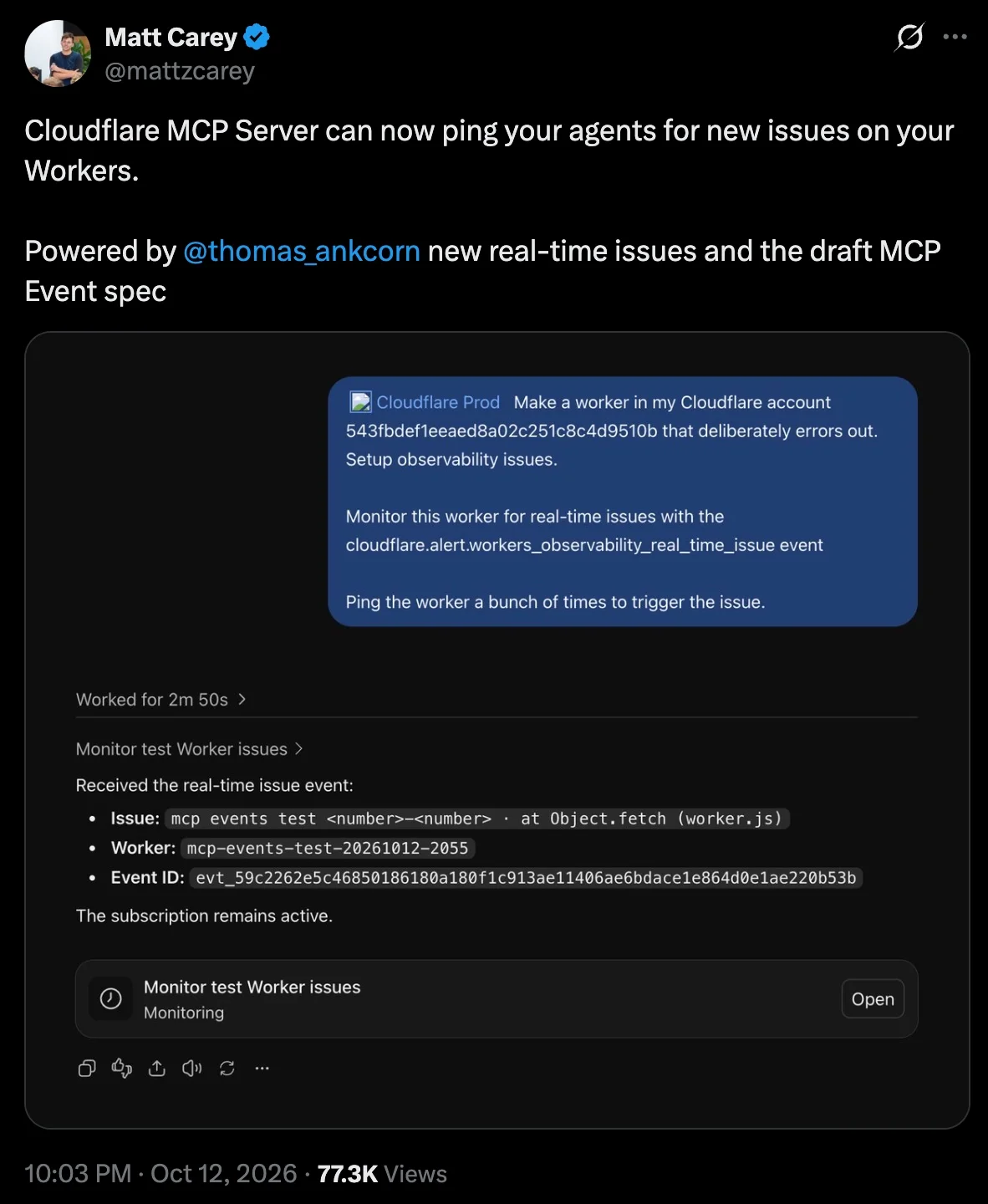
Client support for both of these features is still uneven (as of October 2026), so it's important to consider fallbacks. Only some of them can open Linkly's confirmation page, for example, and not all can show an MCP App (Although the major ones like ChatGPT and Claude can). So each feature benefits from a fallback for the clients that lag behind, and the nice thing is that a link to your app is almost always a good one:
-
Linkly can't draw a chart in every chat, so every stats result includes a
dashboardUrlthat opens the same chart in the app.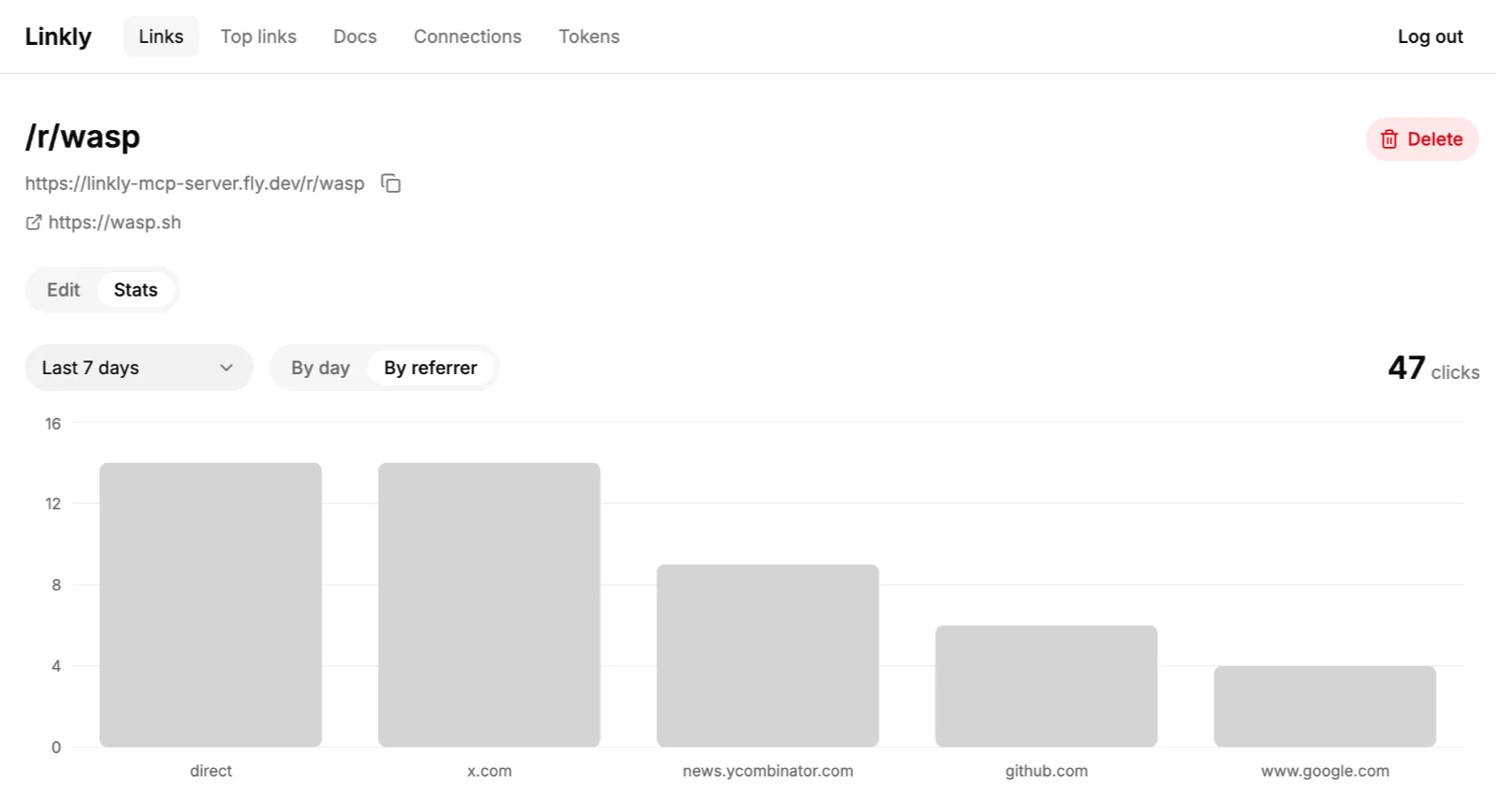
Click stats for /r/wasp in Linkly's dashboard, grouped by referrer -
Clients that can't open the confirmation page get the same page as a link in the tool result, for the agent to pass along.
-
And instead of a form in the chat,
get_dashboard_urlcan return a link to Linkly's create form, already filled in.
When a client adds support, the better version just starts working for your users.
Needless to say, I'm bullish on the MCP space and think it will blossom into a really cool ecosystem with interesting new workflows for app builders. With that said, there are still times when an API or CLI might be a better fit for agents than an MCP. It just depends on the type of data coming from your app, along with your user's typical workflows.
When an API or CLI beats MCP
None of this means APIs are bad for agents. They're "probably fine for 90% of applications": agents call them easily, they're the right tool for raw data exports and bulk jobs, and with a well-written OpenAPI doc, an agent can even turn one into an MCP server for you.
And for some jobs, like bulk updates or exporting raw data, agents are better off writing deterministic tools (e.g. scripts, internal tools, jobs) that call the API directly, rather than going through MCP tools. For example, here are two tasks in Linkly, done both ways:
| Task (Linkly) | OpenAPI + a script | MCP tools |
|---|---|---|
A job you'll rerun: "Tag every link to example.com as partner, and do it again each month" | List, filter, then PATCH each match. A script anyone on the team can read, rerun, and schedule. | With code mode, one loop over update_link, but it lives in one conversation. Without it, 300 round trips through the model. |
| Curated: "How did my launch link do last week?" | One GET /api/v1/links/{id}/stats call. | One get_link_stats call from any client. Its description tells the model to share the dashboardUrl, which opens an interactive chart in Linkly, and to use get_top_links to compare links. |
Notice that the API's advantage isn't really volume. Without code mode, every row an MCP tool returns, and every update, passes through the model's context. But clients with code mode close that gap: the model writes a loop over your tools (that's the "code"), runs it in the client's sandbox (that's the "mode"), and only the result comes back. For an agent doing a job once, that's just as good as a script.


It's important to note that not all clients have code mode so far, though. OpenCode turns it on by default, and Codex has it behind a flag. Claude Code and the Claude apps do have tool search on by default though, which loads the tools the model needs for that task only, keeping context cleaner for those that have many MCP servers connected.
Some apps fix this on the server side instead, with a query tool. PostHog, for example, created a read-only executeSql tool, and "Why did signups drop?" went from four separate tool calls to one query. Agents are good at writing SQL, and the database does the heavy lifting instead of the model's context. That only covers reads, though, and it mostly makes sense if your app is all about data (more on that in the MCP checklist).
What code mode doesn't change, though, is who's calling. A nightly sync, an internal tool, or another company's integration will be better off using an API. And when a job is worth keeping, you probably want your agent to write a script around it, rather than repeatedly calling your tools from within a chat thread.
For the curated task, though, MCP brings a lot of advantages. Both surfaces can answer "How did my launch link do last week?" in one call. But the MCP tool works in any client where you've connected Linkly (e.g. you can't always connect to APIs in agent desktop apps for security reasons), and it comes with the know-how about what to do next, like sharing the chart link or comparing links with an additional get_top_links tool call.
CLIs work well too, but only for agents with a shell. They're definitely at an advantage when an agent needs to interact with local files on the user's own machine, too. If this is the case, a CLI makes sense. A remote MCP server can't read your disk, so to shorten 500 URLs from a file, the agent has to pass every URL through its context, whereas a CLI reads the file itself:
# Shorten every URL in a local file
cat urls.txt | xargs -n1 linkly links create

# Export every link to a local file
linkly links list --all --json > links.json
The agent only has to write one line, the data goes straight from your disk to the API without passing through the model, and anyone can rerun it later.
Which tools should you expose to AI agents?
To put it simply, an MCP shines in the agent-native world because it tells agents what they should do, on both the server and client, and is better suited for human-in-the-loop tasks. Meanwhile, APIs and CLIs tend to focus on what agents can do, with emphasis mainly on the server.
So, in summary, here is the general advice I'd give to builders when deciding which tools they should expose to agents:
Build a high-quality MCP server and REST API at the same time, on one layer of operations. Put your server logic in plain functions, and let each surface be a thin adapter over them. Once that layer exists, building any additional surface on top is relatively easy.
Put most of your care into the MCP server. That's where agents get the best experience. MCP is a standard built specifically for agents, after all.
Use the API for code that runs on its own. APIs are still great for raw data exports, bulk writes, and anything that runs without an agent, like a nightly sync or another company's integration. Agents also prefer an API when they're writing a script they'll rerun, and many clients don't support code mode for MCP yet.
A CLI probably isn't necessary, unless e.g. agents need to read local files when interacting with your app. But it's easy to expose one if you've got a good API as the foundation.
Now that we’ve got the theoretical guideline out of the way, it’s time to build this into your app. Part 2 below gives you a structured walkthrough, along with feature checklists, and uses the Linkly code and repo as a reference, so you can be sure you’re bringing the most value to agents as you build these tools into your app.
Part 2: How to build it (a guide you can hand to your agent)
Want your coding agent to build this into your app? Copy this whole section and paste it into your agent along with your request.
Here’s the order I'd build everything in, which is also the order the rest of this section follows:
- Put your logic in operations, one function per action, so every surface is a thin adapter over the same code.
- Expose them through MCP, with task-shaped tools and good descriptions written for the model.
- And through REST, with an OpenAPI document generated from the same schemas.
- Put OAuth in front of your MCP server, and let people choose each permission. Your API can use the same server, but agents calling it will mostly use personal access tokens for now.
- Make destructive actions wait for the human, at least for OAuth connections.
- Add a CLI, if your users really need it.
- Help agents find your agent-facing tools from your domain alone.
Each of the sections below goes into detail on one of these steps: how Linkly does it, with the actual code, plus a list of rules I'd follow and the mistakes I'd avoid.
The foundation: operations underneath every surface
By splitting your app into two layers, every surface you build gets the same logic underneath:
- Operations: your business logic, one function per thing a user can do.
- Surfaces: thin adapters that expose those operations to each kind of caller.
When you click "Create link" in Linkly's dashboard, it calls the exact same createLink function that an agent calls through MCP, or a script calls through the REST API.
Everything that makes your app your app lives in the operation: who's allowed to do what, what counts as valid input, the business rules, and the error messages. Here's createLink, simplified:
export async function createLink(principal: Principal, input: LinkInput, { prisma }: Deps): Promise<LinkOut> {
  requireScope(principal, "links:write");    // who's allowed
  const data = parseInput(LinkInput, input); // what counts as valid input
  if (data.slug) {
    await assertSlugFree(prisma, data.slug); // the rules: a taken slug throws a "conflict" error
    return toLinkOut(await prisma.link.create({ data: { ...data, userId: principal.userId } }));
  }
  // ...otherwise, retry random slugs until one is free
}
Every operation has this shape: who's calling (a Principal, more on that in the OAuth section), the input, and its dependencies, like the database. There's no req, res, or MCP anywhere in it, so any surface can call it, and you can test it without starting a server.
Each surface just translates by turning its own kind of login into a Principal, passing the input along, and formatting the result. In Linkly, that's one line per surface:
// Dashboard (an operation)
runOperation(() => links.createLink(sessionPrincipal(context), args, deps))

// REST API: POST /api/v1/links
res.status(201).json(await links.createLink(principal, req.body ?? {}, deps))

// MCP server: the create_link tool
handler: (principal, input) => links.createLink(principal, input, deps)
Errors stay consistent too. A taken slug is one error in the operation, and each surface shows it its own way, e.g. a toast in the dashboard, a 409 from the API, a tool error the agent can read and retry, and exit code 6 in the CLI.
The one thing to watch out for is someone adding a feature to one surface and forgetting the others. So Linkly has a few plain unit tests that fail when the surfaces drift apart. The main one is just a list: every dashboard operation maps to an MCP tool or to a written reason it's dashboard-only, like "consent has to come from the human". Similar tests cover the CLI and the REST API. Gaps are fine, as long as each one is a decision and not something someone forgot.
If you already have an app, your logic probably lives in controllers or UI code, and you don't have to move it all at once. Pick the 3–5 actions an agent would use most. For Linkly, that's creating a link, listing links, and getting a link's stats. Move each one into an operation, point your dashboard at it first so your own users test it, and then exposing it to agents is just adding adapters.
The MCP server
Once your operations exist, the MCP server and the REST API are two thin layers over the same functions, so you can build them in whichever order you like. The difference is who reads them. A REST API is read by a developer, or their agent, who reads the docs and then writes code. MCP tools are read by the model every time it decides what to call. So most of the work in an MCP server is in how the tools are described.
A tool's description has to carry the know-how, not just the reference, e.g. when to use this tool instead of a similar one, what to do after it, and what to show the user. If you just generate one tool per endpoint, you get the API reference without some core benefits of MCP. Here's create_link in full:
// src/links/mcp.ts
defineTool({
  name: "create_link",
  title: "Create a link",
  toolset: "links",
  scope: "links:write",
  description:
    "Creates a short link that redirects to `destinationUrl`. Omit `slug` for a random 7-character one; a taken slug returns a conflict error. Returns the new link with its `shortUrl` to share. To change it later use update_link.",
  input: {
    destinationUrl: destinationUrlSchema,
    slug: slugSchema.optional().describe("Custom slug (3–40 chars of a-z, 0-9, '-'). Omit it for a random one."),
    title: titleSchema.optional().describe("Optional human-readable label for the link."),
    tags: tagsSchema.optional().describe("Up to 10 tags (each up to 30 chars) for grouping and filtering. Stored lowercase."),
  },
  output: LinkOut.shape,
  annotations: { readOnlyHint: false, destructiveHint: false, idempotentHint: false, openWorldHint: false },
  handler: (principal, input) => links.createLink(principal, input, deps),
}),
The input schemas and the permission (scope) are the same ones every other surface uses. What's written just for MCP is the description, which says what happens with a taken slug, what comes back, and which tool to use next, and the annotations, which tell the client whether the tool only reads or changes something.
Here's the checklist I'd hold any MCP server to:
- Descriptions say when to use the tool instead of a related one, and what to do after common errors.
- Cover every capability while avoiding near-duplicate tools the model has to choose between.
- Don't merge across a permission or risk boundary. Reading a link and deleting it stay separate tools.
- Decide what happens when a connection is missing a permission. Linkly hides the tools whose permission the user didn't grant (simple, works in every client). The MCP spec also suggests using a step-up flow: you list every tool, and when one gets called without the right permission, the client asks the user for just that permission and retries.
- Add annotations and output schemas to every tool, and instructions to the server. The instructions are a few sentences the client hands the model up front: what your app is, and how its tools fit together.
- Add a "who am I" tool. Linkly's
whoamireturns the account, its permissions, and whether deletes need confirmation, so an agent can check what it's allowed to do before it tries. - Accept the identifiers people actually use. People know a Linkly link by its slug, not its ID, so every tool that takes a link accepts either one.
- Make every error say what to do next. When a link doesn't exist, Linkly answers:
not_found: Link "abc" not found. Use list_links to find valid IDs or slugs. - Link back to your app. Many of Linkly's tool results include a
dashboardUrl, so the user can open the same view in the dashboard. - Leave tool search and code mode to the client. Most clients already load only the tools they need, and more are adding code mode, so expose plain, well-described tools instead of hiding them behind your own
search()andexecute(). - Add tools for your docs. Linkly's
search_docsandread_doclet agents look up how the product works before they guess.
The REST API
The REST API has less to invent, but a few things still matter most for agents and the code they write:
- Generate the OpenAPI document from the same schemas the operations validate with, so the documented inputs can't drift from the real ones.
- Put the permissions and the login in the OpenAPI document. Each Linkly operation lists the scope it needs, and the document explains both ways to log in, a personal access token or OAuth. An agent can work out what token it needs without asking.
- Mark risk with
x-destructive. The HTTP method doesn't tell an agent what's dangerous, since aPOSTcan be just as irreversible as aDELETE. So every Linkly operation has anx-destructivefield, and it'strueonly forDELETE /links/{id}. - Return one error shape. Every Linkly error is
{ "error": { "code": "conflict", "message": "…" } }with the matching status, so code can branch oncodeand an agent can read the same message the MCP tool would give it. - Paginate with cursors. A cursor marks where the last page ended, so a script walking through thousands of links doesn't skip or repeat any when new ones are added along the way, which page numbers can't promise.
One OAuth server in front of both
Here's what connecting to Linkly looks like for an agent. The user pastes Linkly's MCP URL into their client, a browser window opens on Linkly, they log in if they need to, and they see this:
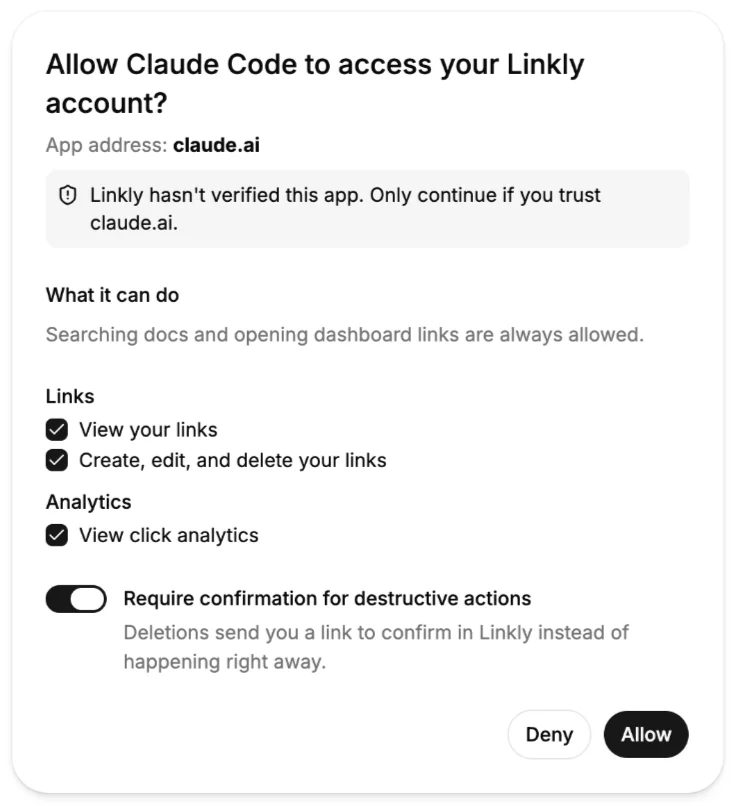
That's the whole setup. Nobody creates a token or copies it anywhere, and nobody has to register an OAuth app in a dashboard first. The client keeps the token and attaches it to every request on its own, so the model never sees it.
Two things make that work without any setup:
- The client finds the login from the URL alone. Its first request has no token, so Linkly answers with a
401that points to a metadata document, and that document says where to log in and where to get tokens. - The client's ID is a URL. This is called CIMD (Client ID Metadata Documents). Claude Code's ID, for example, is a URL on claude.ai that points to a small JSON file with its name and where to send the user back after they log in. Linkly fetches that file the first time it sees the client, so any client can connect without registering first. It's also where the "App address" on the consent screen comes from, which is the domain the user is really trusting.
If you want to see every step, including where each code and token is along the way, here's the full flow:
Permissions
The checkboxes on the consent screen come from Linkly's one list of permissions, the same list the operations check with requireScope. A few rules make them work well:
- Ticking write also ticks read. Updating a link sends the whole link back as a result, so a connection that can change links can already see them anyway.
- Grants are checked on every request. If a user unticks "View click analytics" on the Connected apps page, those tools are gone on the agent's next call.
- Users can take permissions away later, but never add more than the app asked for.
- Tokens are short-lived. Access tokens last an hour, and refresh tokens are replaced every time they're used. If an old refresh token shows up again, Linkly assumes it was stolen and revokes the connection.
However someone logs in, they end up as the same kind of caller, a Principal, so the operations never need to know how.
The REST API can use the same server
Agents don't log in to APIs with OAuth on their own yet. MCP clients run this flow because the MCP spec tells them how to find the login and what to send, and there's nothing like that for a plain REST API. So today, when an agent calls Linkly's API, the user creates a personal access token in Linkly's settings, picks its permissions, and hands it over.
Linkly still puts /api/v1 behind the same OAuth server, because once the server exists it costs almost nothing, and other callers need it. A CLI can open the browser to log in, the way gh auth login does, so the token never gets pasted into a chat. And if another developer's app wants to act for Linkly users, OAuth is the standard way to do it. Each token only works on the surface it was issued for, so an MCP token won't work on the API.
If your auth provider supports the MCP authorization spec, use it. Otherwise, everything here is standard OAuth, so a coding agent can build it from Linkly's src/oauth/ folder.
Destructive actions wait for the human, for OAuth connections
In Part 1, I showed why the confirmation has to come from your server and not from a flag the model can set. Here's how Linkly builds it. (In the Part 1 video, Claude Code was in auto mode, where it approves most tool calls without asking me, and the delete still waited for me.)
Start with a confirmation page in your app. When an agent calls delete_link, Linkly doesn't delete anything yet. It saves a pending deletion and makes a page that shows the short link, where it goes, and which app asked. Only the user who owns the link can confirm it there, logged in to Linkly, and the page works once and expires after 15 minutes. Every surface uses this same page.
Then get the user to that page. How depends on who's calling:
- MCP clients that support URL-mode elicitation open the page for the user. Linkly checks what each request says the client supports.
- Every other MCP client gets the page as a link in the tool result (
status: "confirmation_required"with aconfirmUrl), and the agent passes it along. The REST API does the same with a202 Accepted. This is weaker, since it depends on the agent sharing the link, but the agent still can't confirm for you. - The CLI refuses to delete without
--yes, and the error tells the agent exactly what to run:
Refusing to delete without --yes. Re-run: linkly links delete summer-sale --yes
The agent can add --yes itself, so this one only prevents accidents and makes the delete easy to spot in the command your agent asks to run.
I'd build the link version first, since it works in every client, and then add URL mode on top of it.
Why a page and not a form? MCP elicitation can also ask a question with a form in the chat, but then the answer comes from the client, and your server has to trust it. With a page, the confirmation happens in your app, in the user's own session, so you check your own record of what they clicked. I'd use a form for low-stakes questions like "Tag these 12 links as partner?", and a page for anything that needs the real user, like deletes, payments, or connecting another account. And marking the tool with destructiveHint isn't enough on its own, because it's only a hint: some clients ask the user and some don't.
A few details that took me a while to get right:
-
Wait a little for the click. Clients retry the call as soon as the page opens, usually before the user has clicked anything. So instead of asking again, Linkly waits up to 20 seconds for the decision, and after a few rounds falls back to the link.
-
Don't trust what comes back with the retry. The question goes out with a
requestStatethat the client sends back with the answer. Sign it, tie it to the user and the pending deletion, and let each deletion be confirmed only once. -
Let each connection choose. The consent screen's "Require confirmation for destructive actions" toggle is on by default. Dashboard sessions and personal access tokens delete right away, because in the dashboard you're already the human, and a script has to run without anyone clicking. The catch is that an agent you hand a PAT can also delete without asking you, and since that's how most agents call the API right now, it's worth keeping in mind.
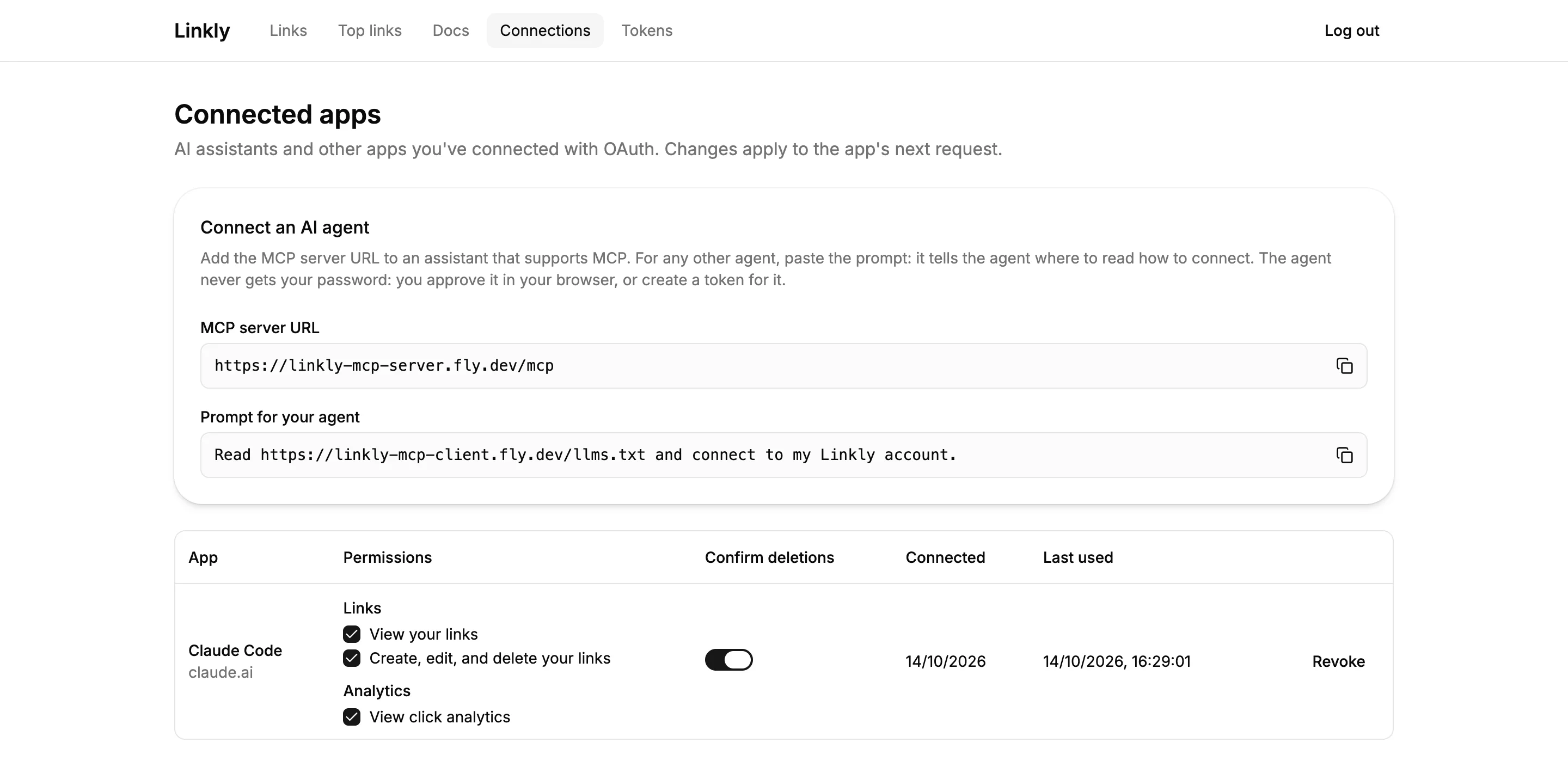
Linkly's Connected apps page: a "Connect an AI agent" card with the MCP server URL and a prompt to copy, and Claude Code listed with its permissions, a Confirm deletions toggle, and a Revoke button -
Offer a way back.
delete_link's description ends with "Consider update_link with archived: true instead if they might want it back." An archived link stops redirecting, but nothing is lost.
And since each surface marks deletes its own way (x-destructive in the OpenAPI doc, destructiveHint on the MCP tool, and --yes on the CLI), Linkly has a test that checks they all agree.
The code for all of this is in the repo: src/deeplinks/pendingActions.ts for the pending deletion, src/mcp/confirmations.ts for URL-mode elicitation and the retries, and cli/src/program.ts for the CLI's --yes.
A CLI, if your users have shells
In Part 1, I said a CLI is mostly worth it if your users have agents with a shell on their own machine, especially for working with local files. If that's you, here's how Linkly's is built.
Linkly's CLI is just a client of the REST API, with its types generated from the OpenAPI document. Most of what makes it work well for agents comes down to a few rules:
- Never prompt. An agent can't answer an interactive prompt, so the command would just hang. If input is missing, return an error that names the flag to add instead.
- Print JSON when piped, in the shape the API documents, and add a
--jsonflag for when it isn't. - Send errors to stderr, with exit codes an agent can branch on: 2 for usage, 3 unauthorized, 4 forbidden, 5 not found, 6 conflict.
- Write
--helpwith examples. That's how an agent figures out how to use your CLI.
Linkly's CLI logs in with a personal access token (linkly auth login --token lk_pat_..., or LINKLY_TOKEN), saved in a config file only you can read. Since the REST API sits behind the same OAuth server, a CLI could open a browser to log in instead, the way gh auth login and gcloud auth login do. Linkly's CLI doesn't do that yet, though.
Help agents find you from your domain
Say a user tells their agent to "use myapp.com". The agent fetches your homepage, and if it's a single-page app, all it gets back is an empty <div id="root"> and a script tag, with nothing to follow. Once an agent has your MCP URL, the 401 from the OAuth section takes it the rest of the way, but there's no single standard yet for getting from a domain to that URL. Different agents look in different places, so I'd cover all of them. They're cheap, and Linkly does each one:
-
An
llms.txtat the root of your domain. It's a short Markdown file that tells an agent how to connect. Linkly generates it at build time from the same paths and docs the app uses, so it can't go stale. -
A prerendered landing page with a visible "For AI agents" section. Agents usually fetch your page and read it as text, so the text needs to be in the HTML before any JavaScript runs. Linkly prerenders its homepage and docs (
prerender: trueon the route in Wasp), and the homepage has a "For AI agents" card with the MCP URL and a link tollms.txt.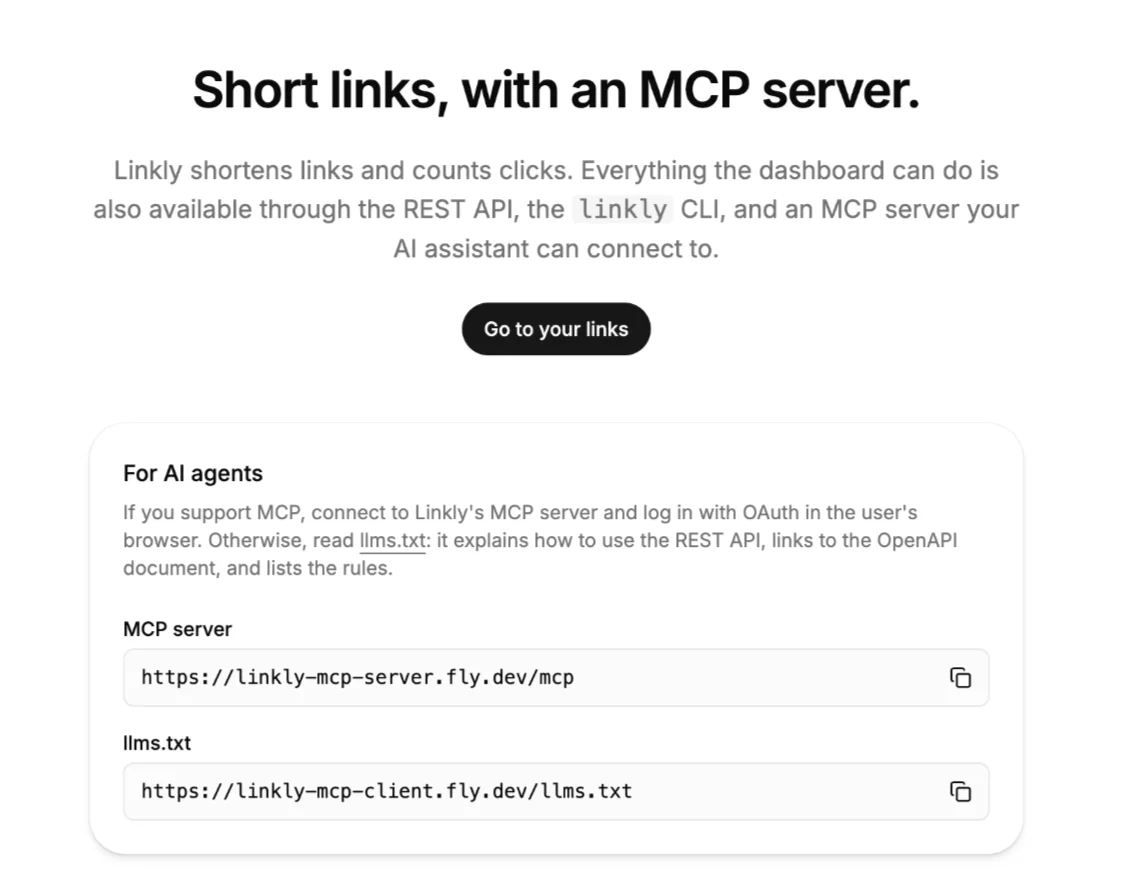
Linkly's prerendered homepage with a "For AI agents" card that gives the MCP server URL and the llms.txt URL -
Your OpenAPI document at well-known places. Linkly serves it at
/.well-known/openapi.jsonfor agents that guess that path, lists it in/.well-known/api-catalog(RFC 9727, the one registered path for this), and adds aLink: <…/openapi.json>; rel="service-desc"header to every/api/v1response. Code that follows links finds the document from any API call.
The llms.txt only says what the OpenAPI document can't: which way to connect, what to do without OAuth, and the rules. Here's Linkly's, trimmed:
# Linkly

> Linkly shortens links and counts their clicks. Everything the dashboard can do, an AI agent can do too: through Linkly's MCP server, or through its REST API.

## MCP (recommended)

- [MCP server](https://myapp.com/mcp): use this if you support MCP. Log in with OAuth in the user's browser: there's no API key to copy and no client registration.

## REST API

- [OpenAPI document](https://myapp.com/api/v1/openapi.json): every endpoint, the scope each one needs, which operations are destructive (`x-destructive`), and how to log in.
- If you can't do OAuth, ask the user for a personal access token from [Tokens](/settings/tokens), with only the scopes the task needs.

## Rules

- Never ask the user for their Linkly password. Log in with OAuth, or ask for a personal access token.
- Ask the user before any operation marked `x-destructive: true`, such as deleting a link.
The password rule matters more than it looks. With the user's password, an agent could log in as them directly and skip the consent screen, along with every permission the user would have picked there.
All of this is still guesswork on the agent's side, though. The most reliable way in is a URL the user hands over themselves, so Linkly's Connected apps page also has a "Connect an AI agent" card with the MCP URL and a ready prompt to copy: "Read https://myapp.com/llms.txt and connect to my Linkly account."
Hardening for agent callers
Once agents can use your app, it has a new kind of caller, one that reads everything you send it and retries whenever something fails. Here are two risks I'd plan for, and one habit I'd pick up.
- Prompt injection through your own data. Everything your tools return ends up in the model's context, and the model can't always tell data apart from instructions. So it's worth asking who can write the text your tools send back. In Linkly, anyone who clicks a short link controls the
Refererheader, and referrers show up inget_link_stats. That's a stranger's text landing in the user's agent. So Linkly only keeps the hostname, likenews.ycombinator.com, and while it stores the visitor's user agent, it never returns it. You can't filter out every planted instruction, so limit what outsiders can write, and keep the earlier defenses in place. That way, even an agent that gets fooled can only do what the user allowed, and it still can't delete anything without them. - Retries and loops. Agents retry a lot, and a confused one can call the same tool over and over. Rate-limit per connection, not just per user, so one runaway agent doesn't lock the user out of their own dashboard. And answer with a
429and aRetry-Afterheader, so the agent knows to wait instead of trying again right away. Linkly doesn't do this yet, since I left rate limiting out to keep the example small, but I'd add it before letting real agents in. - Test with a few real clients, not just one. I'd start with Claude Code on localhost, then use a tunnel for claude.ai and ChatGPT, since they only connect to a public HTTPS URL. Clients really do differ, for example in which ones can open the delete confirmation page.
The state of MCP (October 2026)
Most of what's in this post should hold up for a long time: operations underneath, task-shaped tools on top, one login for every surface, and destructive actions that wait for the human. The details around them are still moving quickly, though. Here's where things stand as of October 2026:
- The protocol went stateless in the 2026-07-28 revision, and clients are still catching up.
- CIMD is the recommended way for clients to identify themselves, and Dynamic Client Registration is deprecated, but CIMD itself is still an IETF draft, and client support varies.
- Elicitation, MCP Apps, and Events work in some clients and not others. URL-mode elicitation, for example, works in the Claude Code CLI, in Codex and OpenCode with a setting turned on, and not yet in ChatGPT (which does support form mode), Claude Desktop, or claude.ai. Events shipped in ChatGPT, while the spec for them is still a draft.
- Code mode is spreading through agent frameworks and servers like Cloudflare's, but the current advice is to let the MCP client implement tool search and code mode, not the MCP server. On the client side, OpenCode does code mode by default and Codex has it behind a flag, while Claude Code and the Claude apps stick to tool search for now.
- WebMCP could bring tools into the browser. It's a proposed browser API that lets a web page register its own tools, so an agent browsing your site can call them instead of clicking around and reading screenshots. ChatGPT's desktop browser added support in August, so ChatGPT and Codex can use those tools when you visit a compatible site. Claude doesn't support it yet. It's still an experimental W3C proposal in a Chrome origin trial, though, so I think it's worth learning about and I'd keep an eye on it.
None of that changes the design, and it's why every feature in this post has a fallback, which is almost always a link. When a client adds support, the better version just starts working for your users.
Go build your own
If you want to build this yourself, the easiest way is to hand this post, and the Linkly repo, to your coding agent as a reference. The repo has every piece from this post, and its README shows where each one lives.
Linkly is built with Wasp, and a lot of the plumbing here, like turning operations into MCP tools and REST routes, or running the OAuth server, is the kind of thing we'd like Wasp to handle for you automatically. So look out for these features as part of the Wasp framework in the future!
Needless to say, I'm a big fan of where these tools are headed, especially MCP. Agents are going to be a big part of how people use your app, and it's a good time to start building for them.
If you want to try Wasp in the meantime, install the CLI with npm i -g @wasp.sh/wasp-cli, check out the GitHub repo, and come say hi on Discord.