Wasp Is Now Friendlier To AI Agents

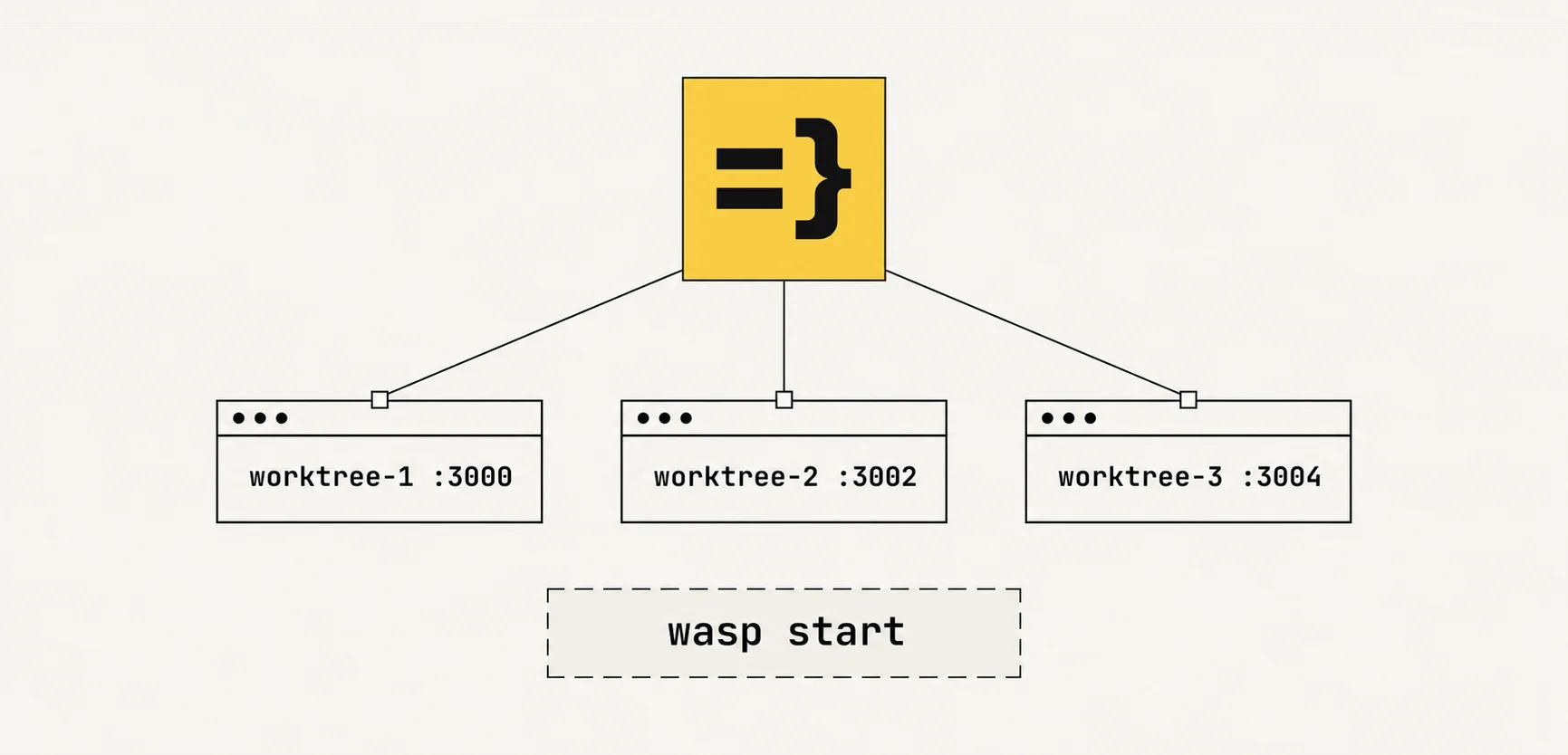
Wasp 0.26 improves support for agent orchestrators and running multiple instances of a Wasp project in Git worktrees:
- Incompatible Wasp commands no longer interfere with each other. For example,
executing
wasp buildwhenwasp startis already running won't corrupt the generated code. - Wasp no longer runs into "Port is already taken" errors when agents
spin up multiple dev servers across worktrees. Both
wasp startandwasp start dbnow dynamically look for free ports.
What are Git worktrees and why do agent orchestrators need them?
Before we dig into the new features, let's quickly discuss agent orchestrators and Git worktrees.
If you know all about this, feel free to skip right to the next section. If not, here's a refresher:
- An agent orchestrator is a tool for coordinating agents. It helps you assign tasks to agents and keep track of their work, without juggling thirteen terminal windows and losing your mind. Examples of popular agent orchestrators are Herdr, Workmux, and Conductor.
- Git worktrees are a Git feature that lets you check out multiple branches of a Git project at the same time, each branch in its own directory.
Developers use agent orchestrators to simultaneously work on multiple features. The usual workflow looks like this:
- The orchestrator gives each agent an isolated Git worktree.
- Each agent works on a feature inside its worktree.
- The orchestrator lets you know whenever an agent needs your input.
- When a feature is done, you review the diff and use the orchestrator to merge it into
main, deleting the agent's worktree.
What's new in Wasp?
Previous versions of Wasp didn't have great out-of-the-box support for orchestrator workflows. You could set them up, but the process was more involved than we would have liked.
With Wasp 0.26, you can let your agents loose in as many Git worktrees as you want. They'll stay out of each other's way.
How to use this?
There's nothing special you need to do. Just keep running Wasp commands as you've always done and leave the rest to Wasp.
Read on to understand what makes this experience possible.
Wasp commands no longer fight over the file system
Before Wasp 0.26, running multiple Wasp commands in the same project could cause them to write over each other's outputs.
For example, executing wasp build would break an already running instance of wasp start.
Wasp 0.26 prevents such conflicts:


If someone runs two different commands that write to the same files, Wasp catches it and prints a clear error message. Both you and your agents can then decide what to do about it:
$ wasp start

🐝 --- Starting compilation and setup phase. Hold tight... ------------------------

🐝 --- Compiling wasp project... --------------------------------------------------

[  Wasp  ] Starting npm install
$ wasp build

❌ --- [Error] Wasp project is already in use: ------------------------------------

Another Wasp command (PID 12345) is already running for this project. Stop it before running this command.
Wasp projects no longer fight over ports
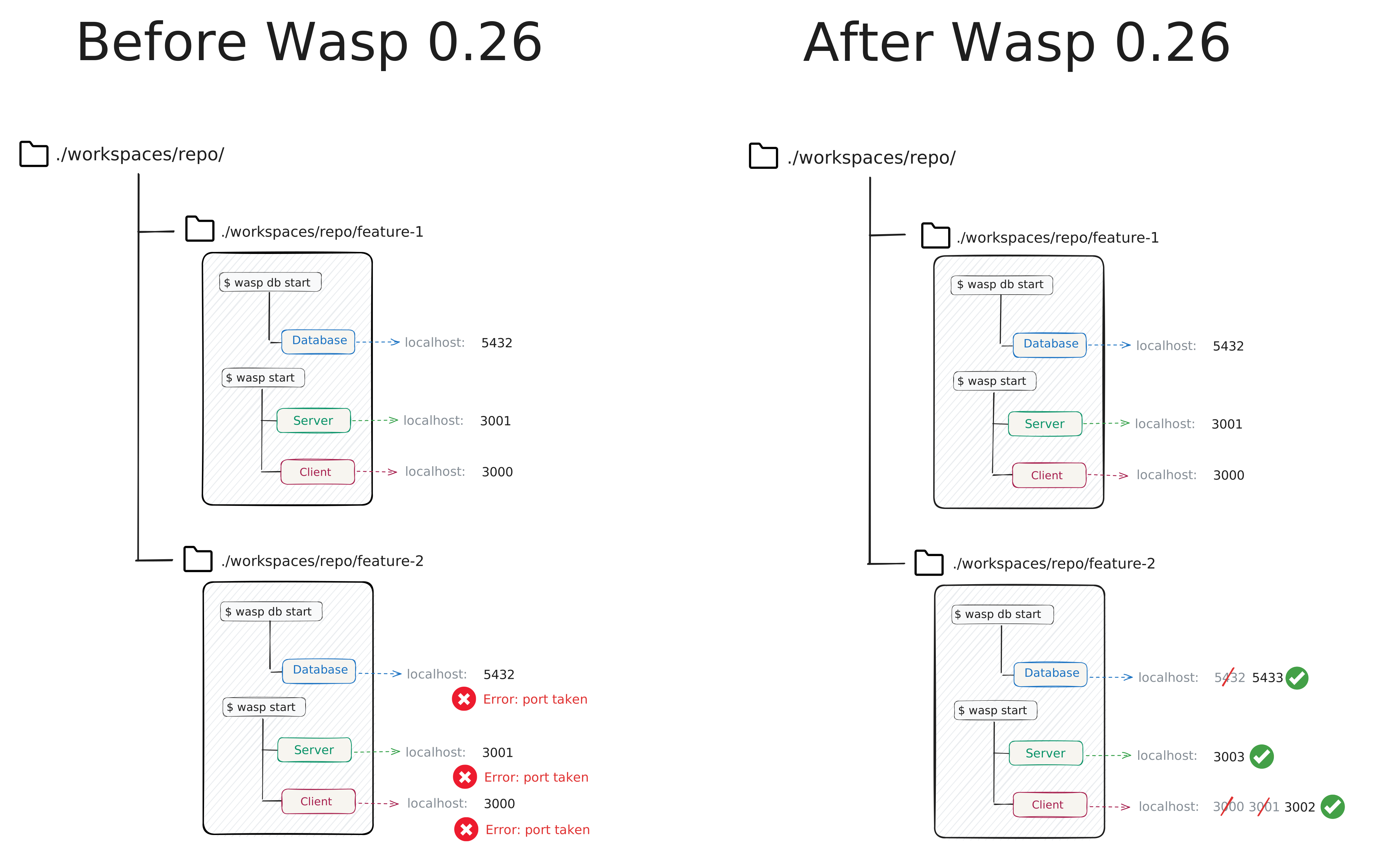
Before Wasp 0.26, running wasp start and wasp start db in multiple worktrees was... problematic.
All clients would fight over port 3000, all servers over 3001, and all databases over 5432. This led to many "Port is already taken" errors.
Wasp 0.26 solves this problem with dynamic port allocation.
If you've built a bespoke system for handling port conflicts, it's finally time to retire it. Just run the commands you want to run, and Wasp takes care of the rest:
# Starts the client and the server on the first two free ports it finds.
# It starts looking at 3000 and goes up.
wasp start

# Starts the dev database on the first free port it finds.
# It starts looking at 5432 and goes up.
wasp start db
That said, there are three things to keep in mind.
- First, your Wasp processes will no longer always run on the same ports (i.e.,
3000for the client,3001for the server, and5432for the dev database). They'll run on the first available ports starting from those, so pay attention to where Wasp tells you they're listening. - Second, since each worktree gets its own database, working in many worktrees means having many databases. Databases are not terribly useful without data, so we recommend you seed them.
- Third, because Wasp now manages the ports and URLs in development, setting them yourself (e.g.,
server.portinvite.config.tsorPORTin.env.server) is an error. This is a breaking change. Check the migration guide for the full list of changes and how to update your project. If your app needs to be reachable at a different address (e.g., a LAN hostname or an HTTPS tunnel), use the new--client-urland--server-urlflags instead.
Bonus feature
Wasp 0.26 allows you to specify the exact development ports you want Wasp to use for your client, server, and database.
The client and server flags work for both wasp start and wasp build start:
wasp start --client-port 4000 --server-port 5000
wasp build start --client-port 4000 --server-port 5000
wasp start db --db-port 6000
If any of those ports is taken, Wasp will fail instead of looking for alternatives. The reasoning is that you care about your process running on those specific ports, so it's better to explicitly fail than silently start listening elsewhere. It's therefore up to you to either free those ports up, specify different ports, or remove the port arguments.
The --db-port flag was contributed by Nihal Ahamed.
Thanks for all the patience during the design changes and reviews, Nihal!
Try it out
Parallel worktree support is live in Wasp 0.26. If you're not on it yet, update your Wasp CLI:
npm i -g @wasp.sh/wasp-cli
If you haven't set up worktrees for your Wasp project yet, the Git worktree setup guide walks you through it.
We'd love to hear how it works for you - come chat with us on Discord!