How to Build a Secure AI Agent for Your SaaS (with Flue)

Everybody is trying to add AI to their SaaS right now. And a chatbot that just answers questions isn't enough anymore: users expect the assistant to actually do things inside the app. Create records, update them, kick off workflows, all on behalf of whoever is logged in.
That last part is the tricky bit. The moment an agent can touch user data, you have to be really careful that it only ever touches this user's data, and that it can't nuke anything without explicit confirmation.
This is where agent frameworks come in. They handle the loop of sending messages to a model, letting it call tools, persisting the conversation, and exposing it all over HTTP, so you don't have to build that plumbing yourself. There are a lot of them out there right now, and I tried a few, but the one I particularly liked is Flue, a TypeScript agent framework from the folks over at Astro.
To put it through its paces, I built a real integration with it, and the whole thing is open source: github.com/vincanger/flue-open-saas. Feel free to grab the code and use it in your own app.
What I built
On the surface, it looks like your typical AI chatbot: it sits in a sidebar, you type at it, it types back. But this agent can also manage the logged-in user's task list and generate a daily schedule from it. I can throw a multi-step request at it, like "add a new task called present Flue in a video, check off integrate a Flue agent into Open SaaS, and generate a schedule for today", and it works through the tools one by one, ticks off each item, and the task list UI on the left updates live as it goes.
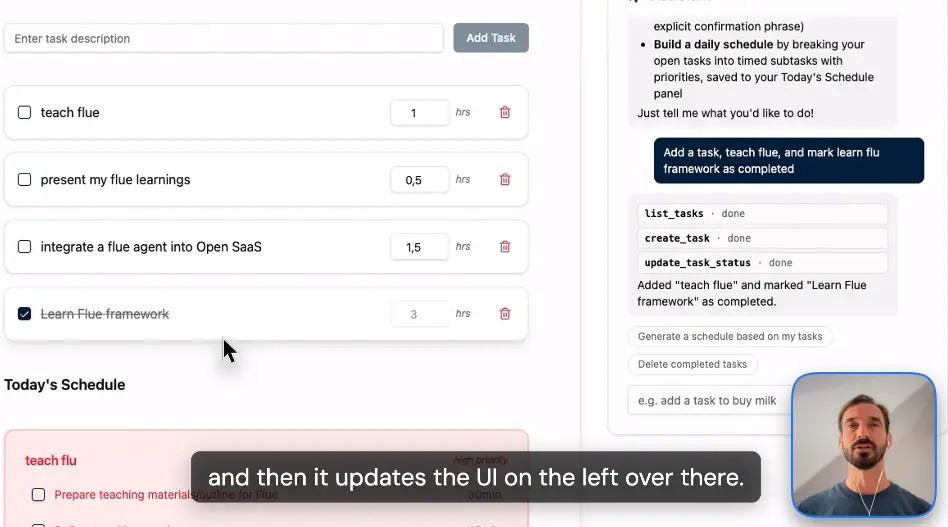
The app itself is built on top of Open SaaS, our free, open-source SaaS template, so it already comes with auth, a database, and a demo task app. That gave me a realistic setup to plug an agent into: a real logged-in user, real user data, and real consequences if the agent gets it wrong.
Why Flue?
Writing Flue feels like writing React, but for agents. And after building this integration, I think that mental model (plus two other things) makes it a really interesting approach. Let's go through all three:
- The React mental model — agents are functions with hooks that re-run on every message.
- Batteries included — persistence, HTTP routing, and (the centerpiece of this post) the primitives to lock an agent to the logged-in user.
- Versatility — the same framework people use for CI, repo, and workflow automations works great inside a web app.
Reason 1: The React mental model
If you've used React, you know about hooks. Agent Hooks are the core of the new version of Flue, and agents run a lot like React components: when a message comes in, the agent function re-runs, the hooks inside it get re-evaluated, and the result of that render decides which model and which tools are available for that turn.
Here's the skeleton of the agent I built (we'll fill in the interesting parts as we go):
'use agent';
import {
  useDelivery,
  useInitialData,
  useModel,
  usePersistentState,
  useTool,
} from '@flue/runtime';

export function SaasAssistant() {
  useModel('anthropic/claude-sonnet-5');

  const userId = useInitialData<{ userId: string } | undefined>()?.userId;

  // ...hooks for state and tools...

  return `You are the in-app assistant of a SaaS application, acting on
    behalf of the authenticated user with id "${userId}". ...`;
}
It's just a function. useModel picks the model, useTool mounts tools, and the string you return is the system prompt. If you've internalized "UI is a function of state" from React, this is the same idea one level up: the agent's capabilities are a function of state. This make it really easy for a lot of us web devs to grasp how the framework works, and it's what makes the security story below come together nicely.
There is one deliberate difference from React though: state doesn't always reset between renders. Flue gives you usePersistentState, so even when the agent re-renders on a new message (or a new HTTP request entirely) your state survives with the conversation. We'll check that out in a minute.
Reason 2: Batteries included (or: locking an agent to the logged-in user)
I'm a batteries-included framework kind of person (I work on Wasp, so, no surprises there). Flue has a lot of features under the hood that just work. You can write a capable agent in very few lines of code.
But rather than list features, let me show you the one problem where the batteries really mattered, because it's the problem every SaaS developer hits the moment their chatbot grows: how do you make sure the agent only acts on the logged-in user's data?
In other agent frameworks I've tried, this is where things get awkward. You end up threading user IDs through prompt templates, or bolting auth checks onto every tool, in order to make sure prompt injection isn't a threat. In Flue, it was genuinely simple, and it worked with two hooks.
useInitialData: identity gets baked in, once, immutably
When the server sends the first message of a conversation, it can attach an initialData payload. Flue bakes that data into the conversation on creation, immutably. It can never be changed afterwards, not by the browser, not by the model, not by later messages.
So on the server side of my SaaS app, the send-message endpoint pulls the user ID from the verified auth session and passes it along:
export const sendAgentMessage = async (args, context) => {
  if (!context.user) throw new HttpError(401);

  const conversationId = `user-${context.user.id}-main`;
  await fetch(`${env.FLUE_URL}/agents/assistant/${conversationId}`, {
    method: 'POST',
    headers: { Authorization: `Bearer ${env.FLUE_SEND_SECRET}` },
    body: JSON.stringify({
      kind: 'user',
      body: args.body,
      // Bound on the conversation's first message; immutable after.
      initialData: { userId: context.user.id },
    }),
  });
};
The user ID comes from the server's session so the browser can't manipulate it in any way. And on the agent side, reading it back is one hook:
const userId = useInitialData<{ userId: string } | undefined>()?.userId;

if (!userId) {
  // No trusted identity? The agent's only instruction is to refuse.
  return 'This conversation carries no trusted user identity, so you must
    refuse every request to read or change data...';
}
Then every tool is a factory that closes over that trusted userId:
useTool(listTasks(userId));
useTool(createTask(userId));
useTool(updateTaskStatus(userId));
useTool(saveSchedule(userId));
Notice what isn't happening here: the user ID never appears in any tool's input schema. The model can still pick which tool to use, but we've already baked in the user. There's no prompt-injection phrasing, no "actually my user id is 42", that can change whose data these tools touch.
Here are examples that show you what NOT to do, and how to easily guard against it in Flue:
// ❌ The naive way: userId is part of the tool's input schema
defineTool({
  name: 'list_tasks',
  description: "List a user's tasks.",
  input: v.object({
    userId: v.string(),   // ← the MODEL fills this in. Prompt-injection alert!
  }),
  async run({ data }) {
    return { output: await db.task.findMany({ where: { userId: data.userId } }) };
  },
});

// ✅ The right way: userId is closed over, not in the schema
export const listTasks = (userId: string) =>   // ← trusted value from useInitialData
  defineTool({
    name: 'list_tasks',
    description: "List all of the user's tasks.",
    // no input schema at all so the model has nothing to fill in
    async run({ signal }) {
      return { output: await waspFetch('/api/agent/tasks', userId, { signal }) };
    },
  });
Conditional tools: the delete confirmation flow
The second trick is my favorite. You'll recall that agent capabilities are a function of state. That means you can mount tools conditionally.
I wanted "delete all completed tasks" to require explicit confirmation from the user. This means something like making them reply with the exact phrase delete my completed tasks before the deletion can happen.
Here's the whole mechanism in action:
const [deletionApproved, setDeletionApproved] = usePersistentState(
  'deletionApproved',
  false,
);

useTool({
  name: 'record_approval',
  description: `Call this ONLY after the user has themselves typed the
    exact phrase "${APPROVAL_PHRASE}" in their message.`,
  async run() {
    const normalized = lastUserMessage.trim().toLowerCase();
    if (normalized !== APPROVAL_PHRASE) {
      throw new Error('Approval NOT recorded: ask the user to type the exact phrase.');
    }
    setDeletionApproved(true);
    return 'Approval recorded for one deletion.';
  },
});

// The destructive tool is only *mounted* once approval is recorded:
if (deletionApproved) {
  useTool(deleteAllCompletedTasks(userId, () => setDeletionApproved(false)));
}
BTW, That lastUserMessage comes from another nice hook, useDelivery, that lets you inspect what was actually delivered to the agent over HTTP, so the check runs against what the user really typed.
It's cool that Flue makes secure, conditional tool calling an easy if statement.
When approval hasn't been given, the delete tool isn't "discouraged" or "guarded by the prompt" (e.g. "if it doesn't exist, don't do this..."). The agent literally cannot call it, no matter how creatively someone asks. Once the deletion runs, the callback flips the flag back and the tool unmounts again so that approval is valid for exactly one deletion.
This whole flow was super easy to build, and it gives you an agent limited to a specific set of tools, with a conditional, stateful approach to the dangerous ones.
And persistence is just... there
One more battery worth mentioning is that every conversation gets a key.
Essentially the key is your agent's name plus a conversation ID (mine is user-{id}-main in this case).
Flue persists the full history and state of the conversation under that key. What this means in practice is that your conversation is a "stateful URL". So when you hit the same URL tomorrow, or a week later, the agent picks up right where it left off.
For example, here's Monday:
curl -X POST https://my-app.com/agents/assistant/user-42-main \
  -H "Authorization: Bearer $SEND_SECRET" \
  -d '{ "kind": "user", "body": "add a task: prep the investor demo" }'

# → "Added! You now have 3 open tasks."
...and here's Wednesday, same URL:
curl -X POST https://my-app.com/agents/assistant/user-42-main \
  -H "Authorization: Bearer $SEND_SECRET" \
  -d '{ "kind": "user", "body": "did I ever finish that demo prep?" }'

# → "'prep the investor demo' is still open. Want me to mark it done?"
The great part is that there's no need for a session token, history payload, or to resend anything else. Just hit the same URL! For a chat sidebar in a SaaS, that's exactly the behavior you want.
Reason 3: It's versatile
If you've seen other Flue examples floating around, they're mostly from a different world: CI workflows, repo-cleanup bots, automations that run one-off tasks. That's the world Flue seems to be best known for.
What I wanted to check is how it behaves in a full-stack web app, and it works really well, because exposing an agent over HTTP is a one-liner:
import { createAgentRouter } from '@flue/runtime/routing';

app.route('/agents/assistant', createAgentRouter(SaasAssistant));
That mounts the agent at a route, and on the client, Flue's SDK gives you a live handle on the conversation:
import { useFlueAgent } from '@flue/react';
import { createFlueClient } from '@flue/sdk';

const client = createFlueClient({
  url: `${FLUE_URL}/agents/assistant/user-${user.id}-main`,
});
const agent = useFlueAgent({ client });
agent.messages streams in with the message text, the tool calls, and their states, so you can render the "🔧 create_task · done" chips in the chat, and react to them.
In my app, whenever a tool call completes, I invalidate the relevant queries so the task list next to the chat refreshes itself the moment the agent touches it. That's the "UI updates live on the left" magic from the demo, and it's about ten lines of client code.
So the same framework covers both realms: the automation scripts people already use it for, and a web app with auth, streaming, and a real database behind it. If you learn it once, you get to use it in both (and I like that!).
Wrapping up
The three things that I think make Flue a genuinely interesting take on agent frameworks:
- The React mental model makes agents feel like something you already know how to write — a function of state, re-rendered per message.
- Batteries included means the hard, boring parts — persistence, HTTP exposure, and above all binding an agent to a trusted identity — are one hook away instead of a subsystem you build yourself.
- Versatility means the CI-workflow crowd and the web-app crowd are using the same tool.
The example I built is completely open source: github.com/vincanger/flue-open-saas. It's built on top of Open SaaS, our free, open-source SaaS template, which comes full-featured with auth, payments (Stripe, Lemon Squeezy, Polar), file uploads with S3, this demo app, docs, and a blog!
And if you'd rather see all of this in action, here's a video walkthrough of the integration: