> Fetch the complete documentation index at: https://wasp.sh/llms.txt
---
# A Gentle Introduction to Database Migrations in Prisma with Visuals
April 2, 2025 · 19 min read[](https://ilakovac.com)[Mihovil Ilakovac](https://ilakovac.com)Founding Engineer @ Wasp[](https://github.com/infomiho "GitHub")[](https://x.com/infomiho "X")
If you are building an app that needs to store user data, you'll probably need a database (e.g., PostgreSQL). Databases use a **data schema** to organize their data, and database migrations evolve the data schema over time. As time passes and requirements change, you'll iterate on the data schema, generate migration files, and safely apply them to your production database.
In this post, we'll go from the basics of developing your app and applying database migrations locally, before we progress to the more advanced scenarios:
- For this post, I'm using [Prisma](https://www.prisma.io/), but the steps can be reproduced for any other setup as well.
- We'll update an existing production database (without losing user data).
- We'll change the database in a way which introduces a breaking change. It will feel like you have to refuel a fighter jet mid-air, but don't worry, we'll go step by step!
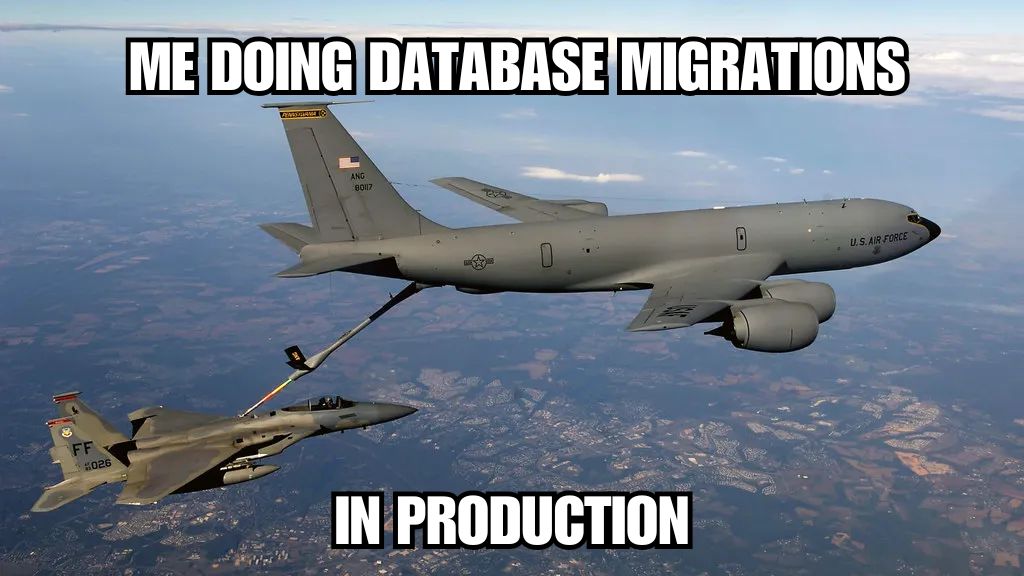
It looks scarier than it really is!
One great analogy by Vadim Kravcenko (who wrote a great migration post, linked below):
> Doing migrations is like working with live wires. You have a new lamp that you need to hang on the ceiling, but you're doing that without turning off electricity.
>
> Vadim Kravcenko
Let's first introduce the app that we will work on.
## Tennis score tracker app
We've built a small but complex enough tennis score tracking app:
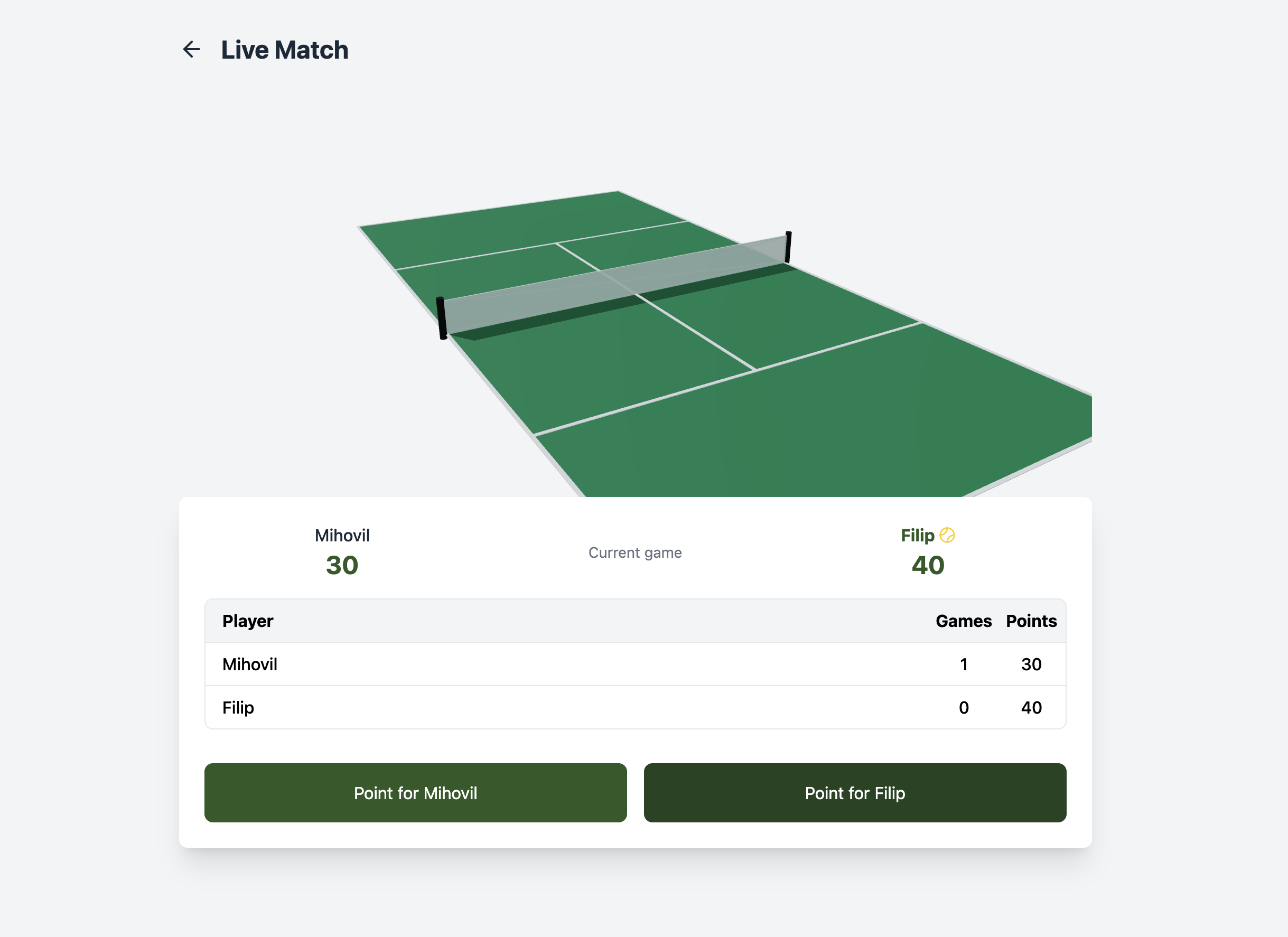
The main interface of our tennis score tracking app
Imagine you are organizing a tennis tournament and you want to keep track of the scores in real-time. Judges can update the scores live and the app users can see all match scores.
:::note
Try out the live app at
The code is open source and you can check it as well: [github.com/wasp-lang/tennis-score-app](http://github.com/wasp-lang/tennis-score-app)
:::
We've built this app with [Wasp](https://wasp.sh/) framework which provides a nice and easy way to build full-stack apps like these (it uses Node.js, React and Prisma under the hood).
Users can log in and create matches…
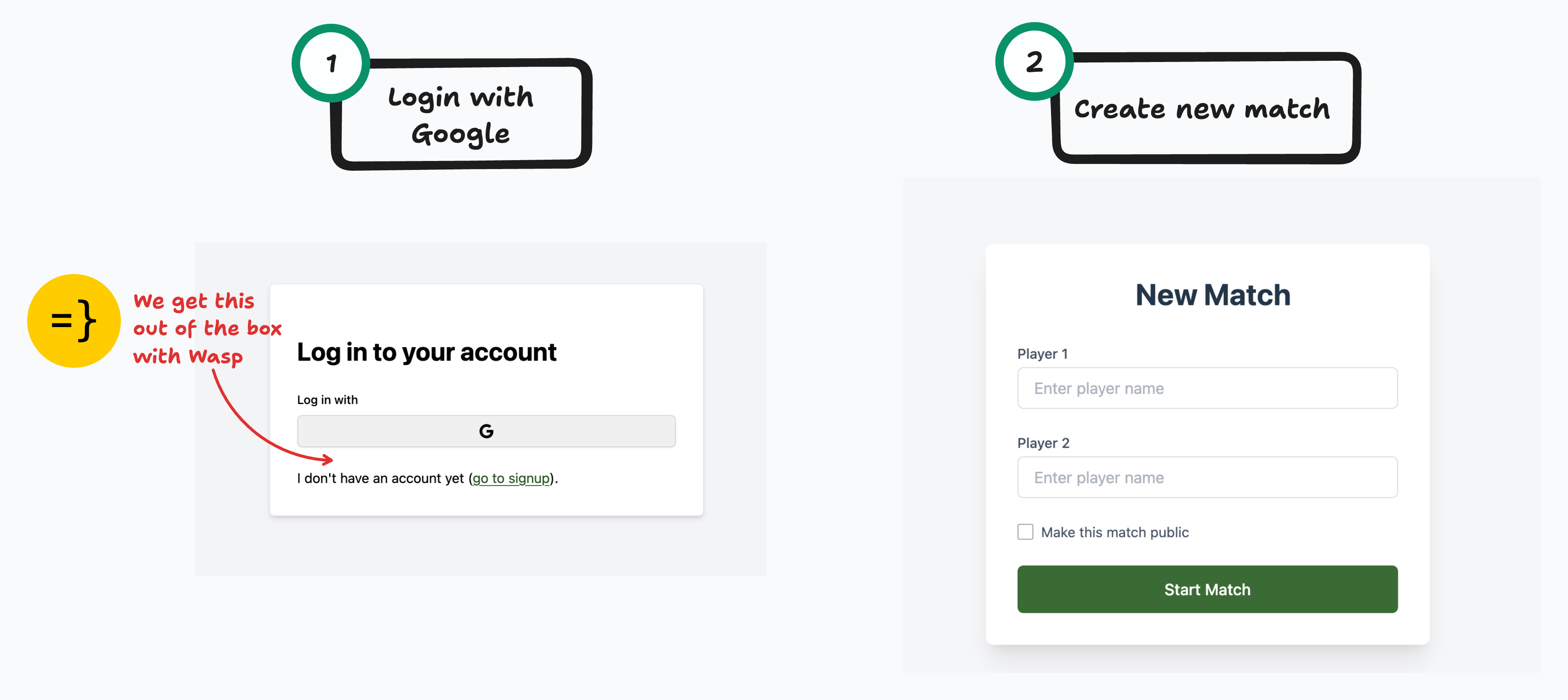
Users can create new matches through this interface
… enter match scores and track all other users' matches.
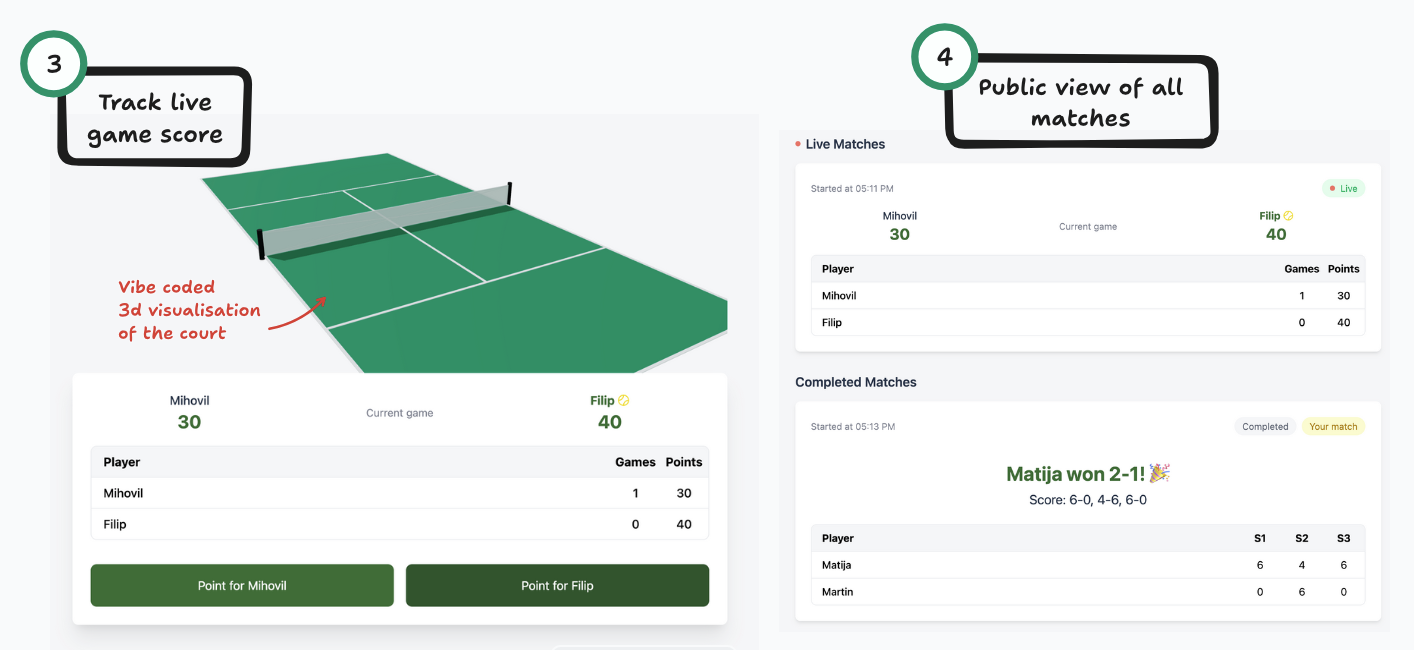
Users can track match scores in real-time
Since Wasp uses [Prisma](https://www.prisma.io/) as its database abstraction layer, we'll show all the database schema changes in Prisma, but all the ideas and techniques are pretty much universal. This means all the steps apply with using only raw SQL or Drizzle.
# Database Migration Scenarios
We'll cover database migrations in three different scenarios:
1. **Developing the app locally and deploying it**
2. **Introducing the new database field, no breaking change:** Adding the concept of private matches → deploying the update
3. **Introducing a complex schema change, a breaking change:** New score storing format → releasing it in multiple deployment steps
## Database Migration No. 1: Using database migrations with local development
While we are developing our app, we'll go through multiple iterations of our data schema. We'll think of one data model, start building our app, realize we need extra fields or we need to organize them differently etc. and our data model will evolve.
For our tennis score-tracking app I came up with this:
- `User` represents a user of our app
- `Match` contains all the match info/score info
- player names
- player points and games for the current set
- `Set` model to keep track of all played sets
Let's focus on the `matches` table to keep things a bit easier to follow:
```tsx
model Match {
id String @id @default(uuid())
createdAt DateTime @default(now())
isComplete Boolean @default(false)
currentSet Int @default(1)
server Int @default(1)
// Relations
createdBy User @relation("CreatedBy", fields: [createdById], references: [id])
createdById String
// Player details
player1Name String
player2Name String
// Current score (for the ongoing set)
player1Points String @default("0")
player2Points String @default("0")
player1Games Int @default(0)
player2Games Int @default(0)
// Set history
sets Set[]
}
```
Once you've written a Prisma schema for your app, you'll need to create a **migration file.** This file will contain SQL commands needed to update your database, such as creating new tables or modifying existing ones, or adding database indexes, etc. Let's run `wasp db migrate-dev` which uses the Prisma CLI in the background and you'll get the following code in the `migrations/` dir:
```sql
-- CreateTable
CREATE TABLE "Match" (
"id" TEXT NOT NULL,
"createdAt" TIMESTAMP(3) NOT NULL DEFAULT CURRENT_TIMESTAMP,
"isComplete" BOOLEAN NOT NULL DEFAULT false,
"currentSet" INTEGER NOT NULL DEFAULT 1,
"server" INTEGER NOT NULL DEFAULT 1,
"createdById" TEXT NOT NULL,
"player1Name" TEXT NOT NULL,
"player2Name" TEXT NOT NULL,
"player1Points" TEXT NOT NULL DEFAULT '0',
"player2Points" TEXT NOT NULL DEFAULT '0',
"player1Games" INTEGER NOT NULL DEFAULT 0,
"player2Games" INTEGER NOT NULL DEFAULT 0,
CONSTRAINT "Match_pkey" PRIMARY KEY ("id")
);
-- CreateTable
-- ... some more SQL here ...
```
Prisma will then apply the change to your local database (we're using PostgreSQL locally that we started via `wasp db start`) and this will enable the app to connect to the database and create users, matches and update scores.
Here's what your **local** database table looks like after you've applied the migration:
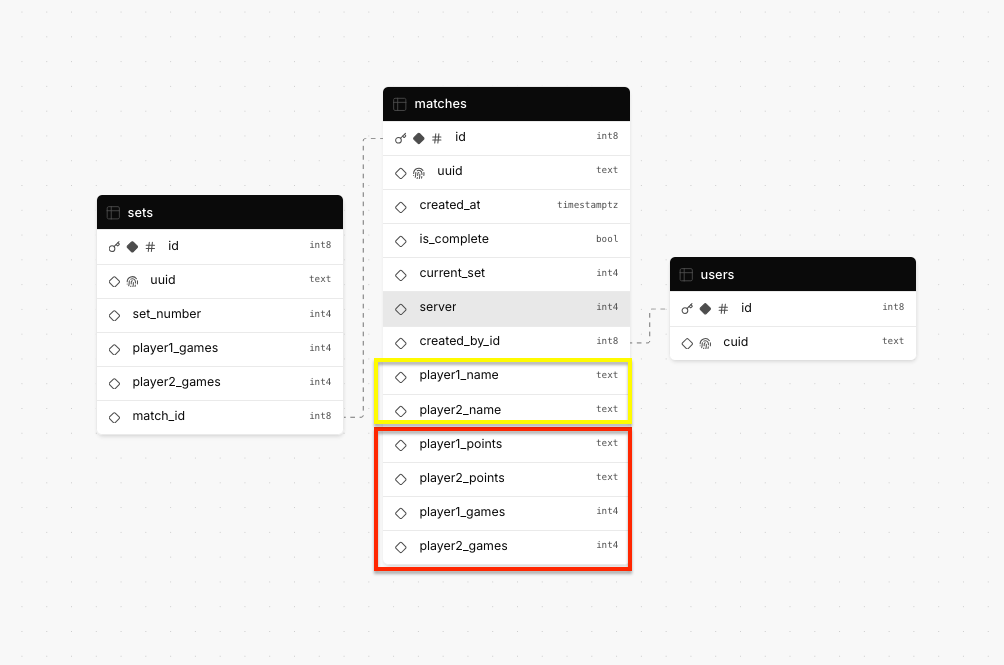
The structure of our matches table in the database
As you can see, migrations are something we do as we change our database's data schema. They updated your local database to have the **tables** that match your current Prisma models.
At first, it might sound like needless bureaucracy for something that you could have done manually with some GUI and clicked around to set up the tables you need. What if you need to have the same table structure in multiple databases (e.g. staging and production environments)? The migration files then become essential in keeping production database tables (called **database schema** more precisely) in sync with what you've defined in your Prisma models file.
When you deploy a Wasp app, the server app's `Dockerfile` runs a Prisma command that applies any migrations you have in the `migrations` dir that are not yet applied. This is great! As you deploy your code changes, the database changes are also deployed.
Let's deploy our app to Fly using Wasp's one-line deploy command `wasp deploy fly launch` and we are live at:
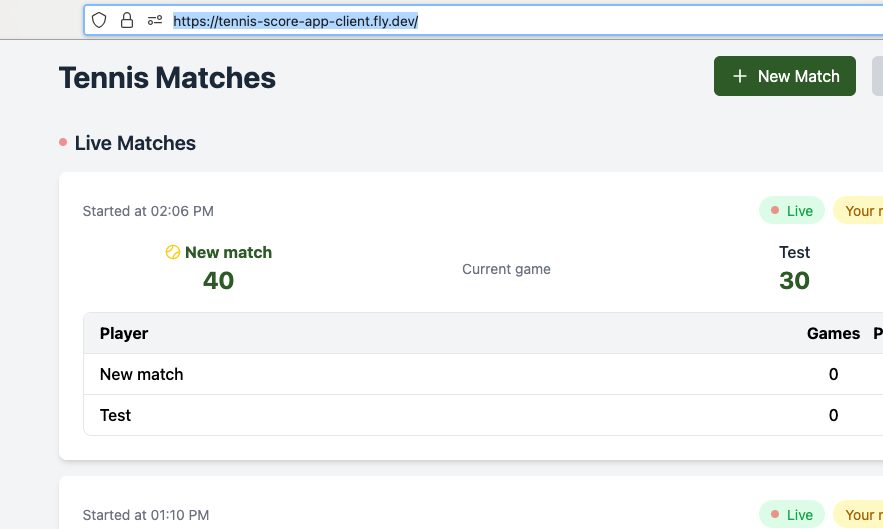
Our app deployed and running on Fly
## Database Migration Scenario No. 2: Adding a new field to the deployed app
After some time we realized we want to enable users to play private matches. Not everyone wants the rest of the world to know their low score.
To enable this in the app's UI, we'll add a public/private toggle button:
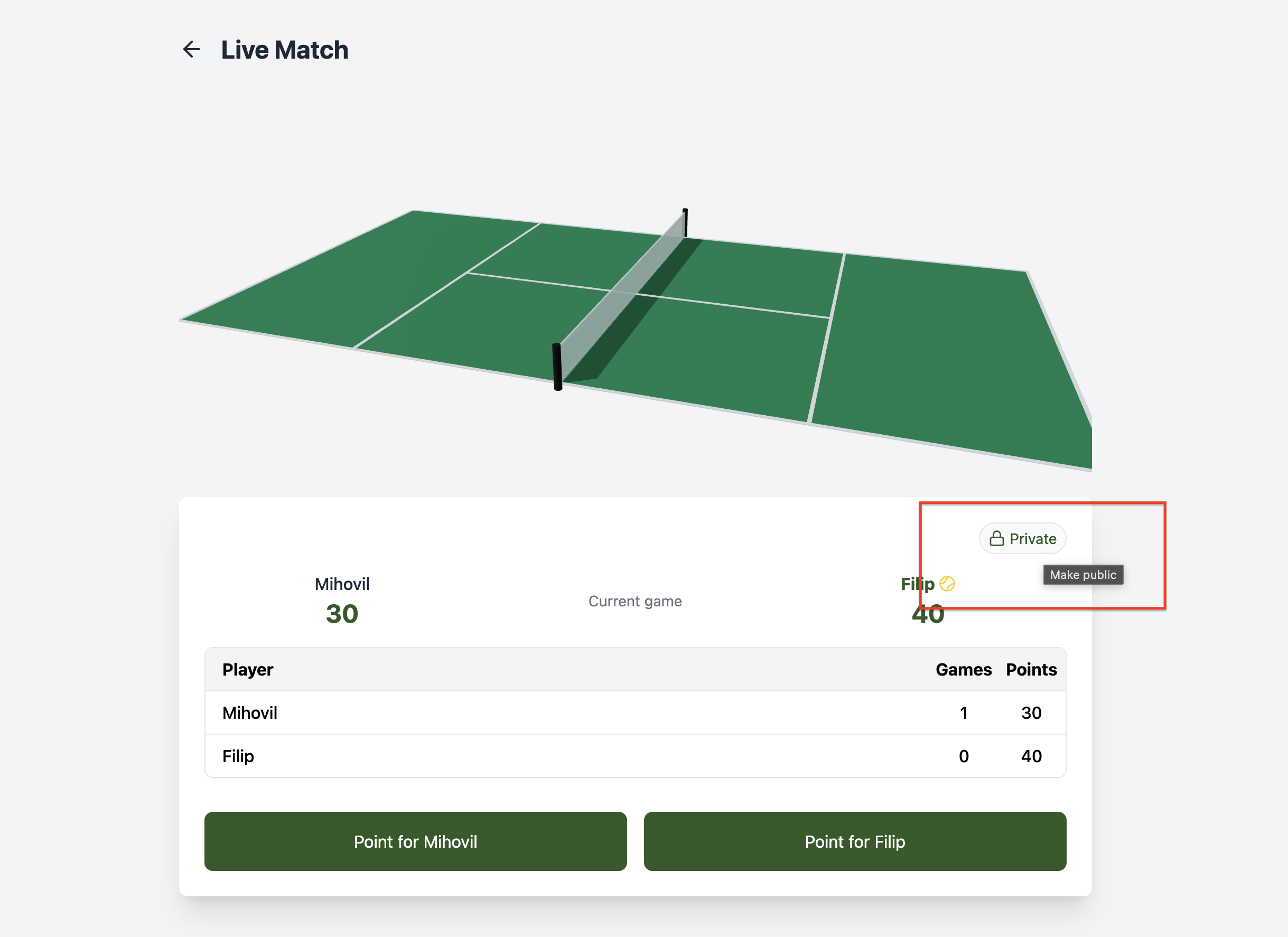
New toggle button for making matches private
To support this functionality, you need to add some extra info in our matches model:
```tsx
model Match {
id String @id @default(uuid())
createdAt DateTime @default(now())
isComplete Boolean @default(false)
// We need this new field
isPublic Boolean @default(false)
// ...
}
```
Okay, this is just one extra line in the model definition. To be able to use it, run `wasp db migrate-dev` and your **local** database is ready to go.
### What about the existing rows, which values will they have?
Let's take a step back and look at one important detail here: the default value.
```tsx
@default(false)
```
Since we already deployed our app, this forces us to think about **existing production data** e.g. matches that our users already created. If we are adding a new field that the app didn't use before, we need a default value so our existing data can still make sense.
Based on our app's logic, we should come up with a default value that makes sense to us. I've put `false` as the default value which can be right or wrong depending on we are trying to achieve. If it's false, we are saying that all the **existing matches** in the database will become **private**. If it's true, the **existing matches** will stay **public** unless users change it in the UI.
In hindsight, I think `true` is the better choice, but I've put it `false` because I thought being extra careful not to expose private matches made more sense. It depends on your app.
**The important lesson here** is that when we go to deploy our app changes and the migration file is applied in production, **the existing matches** will be "migrated" to have the `isPublic` field with the value of `false`. No downtime, no data loss, great! This is all because we had a good default value.
Our **local** and **production** database now looks like this:
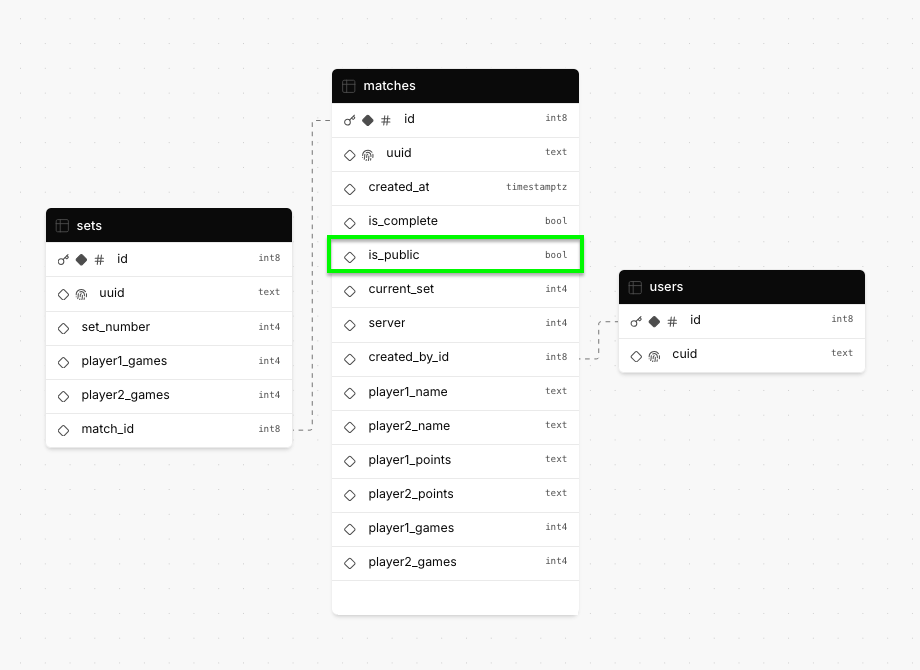
Database structure after adding the isPublic field
### Finding this article useful?
[Wasp](https://wasp.sh/) team is working hard to create content like this, not to mention building a modern, open-source React/NodeJS framework.
The easiest way to show your support is just to star Wasp repo! 🐝 Click on the button below to give Wasp a star and show your support!

[⭐️ Thank You For Your Support 💪](https://github.com/wasp-lang/wasp)
## Database Migration No.3: Breaking change with the score-keeping format
And now for something completely different… a dangerous, complex, multi-step migration. Sounds fun? 😀 These kinds of migrations are usually quite stressful for me because they involve database schema changes that can cause data loss. They can potentially ruin our app and chase away our users.
We'll be using a migration strategy, commonly called **expand & contract pattern** which will enable us to do a breaking change in multiple steps. This strategy should ensure there is no data loss and our users shouldn't notice anything.
### **Database backups**
One important step we should take before doing schema migrations is doing **database backups.** Having automated backups of your database is **crucial** if you are doing anything serious that involves user data. Servers may fail, disks might get corrupted, [data centers burn](https://www.datacenterdynamics.com/en/analysis/ovhcloud-fire-france-data-center/) or a bug in your app might delete your data by accident. How you back up your database will depend on your hosting provider. We used Fly for this app and they have regular disk snapshots which are *enough* for most use cases and certainly good enough for our demo app.
If we are planning to do a complex database schema migration, you should create a database backup just before doing the migration steps.
For example, we run:
```bash
pg_dump -h localhost -U postgres tennis_score_app_server > backup.sql
```
which will create a `backup.sql` file that will enable you to restore the database to this point in time if something goes wrong in the next steps.
With that out of the way, let's jump into the breaking change migration.
### The new database format
Imagine we want to change the way we store the score of a match. We will store it in a JSON field called `score` instead of using 4 different fields`player1_points`, `player2_points` etc. (Let's say that, for some reason, this is really useful for our business case.)
The new JSON format looks something like this:
```json
{
"player1": {
"points": "0",
"games": 0
},
"player2": {
"points": "0",
"games": 0
}
}
```
Again, the main problem is the **existing production data** that we have in our production database. We can't just delete all the tables in our database and recreate them with the new structure. We'd lose valuable user data.
We will do this migration in multiple steps to change the score format without our users noticing anything. We will deploy the changes after each step, test the app and then carry on to the next step.
### The trick - our app will use both new and old fields at the same time
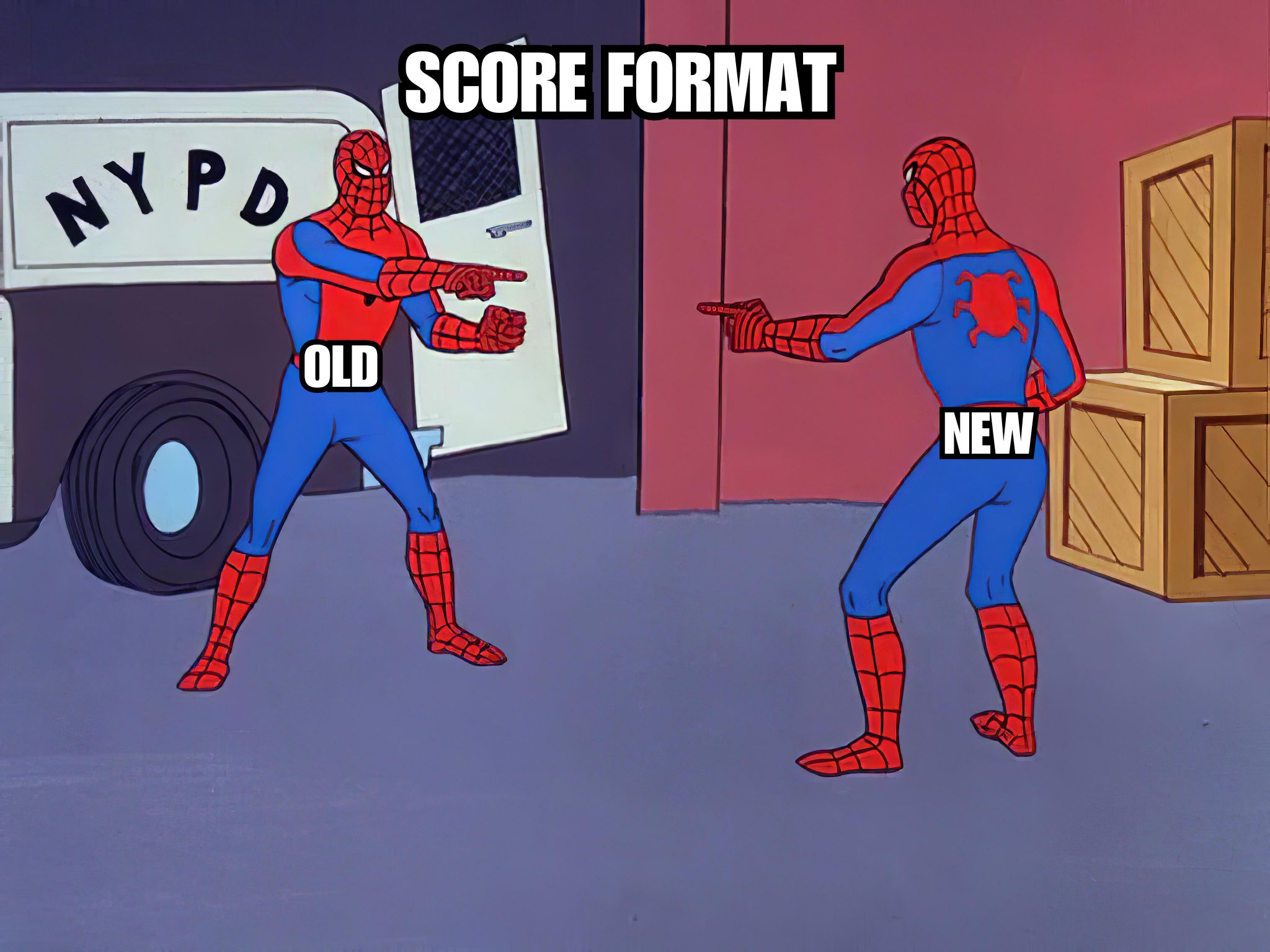
The old way we stored match scores
The "trick" we will use here is that we'll first create the new field, without touching anything else, and the app will still keep using the old format. Then, we'll refactor the app to start using the new field and the old fields both at the same time. Finally, we'll migrate all the "old" data to the new format and remove the "old" fields and logic in its entirety. This is how you do a complex migration like this without any downtime for users.
Let's now see it in action, step by step.
### **Step 1**: Add the new field and start writing to it
We'll start by adding the new optional `score` JSON field:
```tsx
model Match {
// ...
player1Points String @default("0")
player2Points String @default("0")
player1Games Int @default(0)
player2Games Int @default(0)
// Adding a new optional "score" field
score Json?
}
```
**The important thing to notice here** is that we made the field optional. Our existing data doesn't have that field and the database migration wouldn't work if we made it a required field. Since there isn't a sensible default value we can think of, we'll make it **optional (nullable)**. This will allow our existing data to "adopt", it will have the new extra field without any value.
The next important change isn't in our database, but in our **application code**. From now on, we will write the score in **both the old format and the new format.** We'll write the score in the existing fields and \*\*\*\*in the new `score` field. We are making sure that all new matches have the value filled for the new field.
Visually, it can be represented like this:
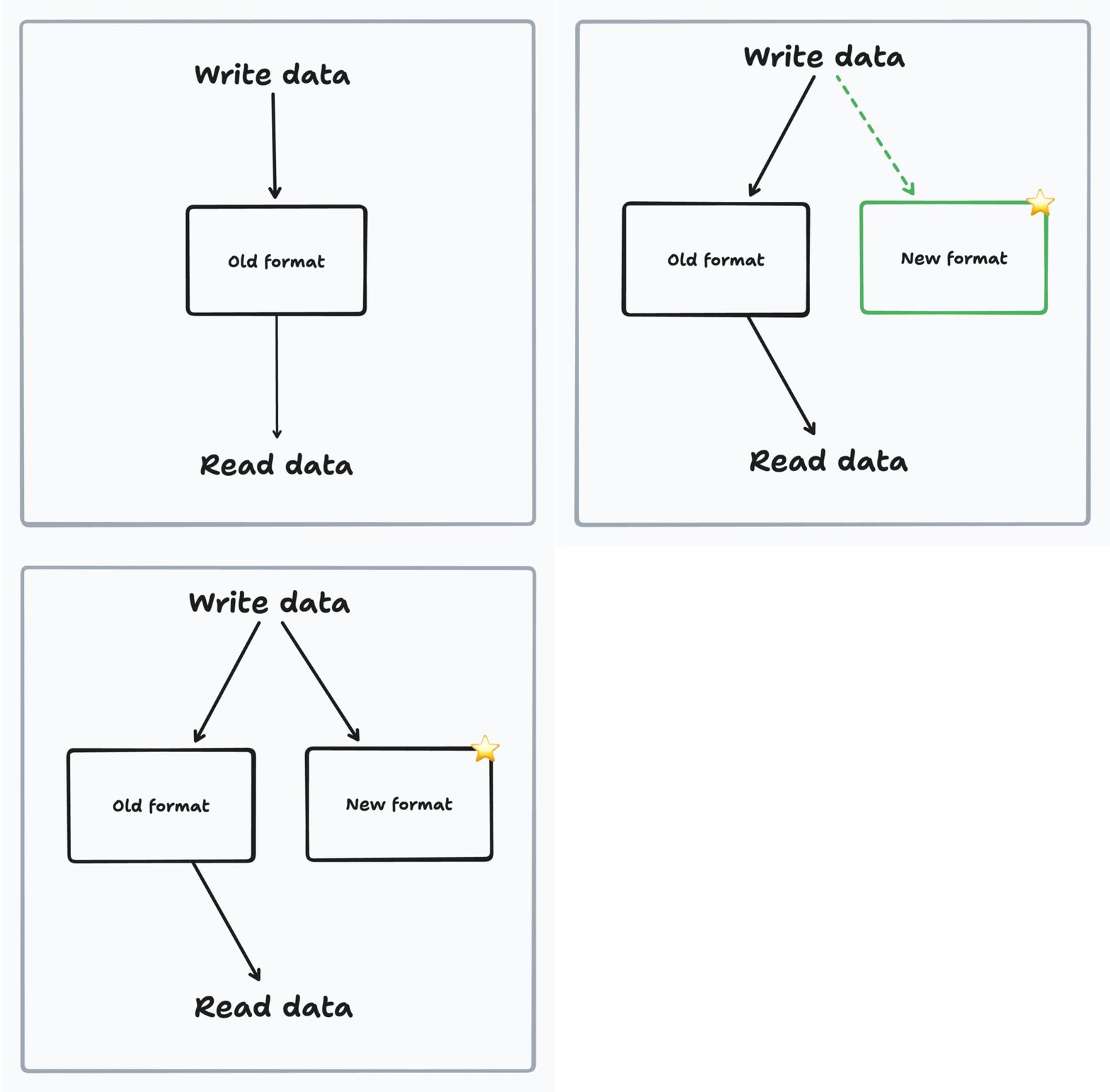
Step 1: Writing to both old and new fields
You can see that we are writing to both old and new fields, but still reading from the old fields.
Alright, cool, we can deploy this now. Nothing should change for our users, in the background, old matches got a new empty field and new matches will have that `score` field populated.
Our production database should look like this now:
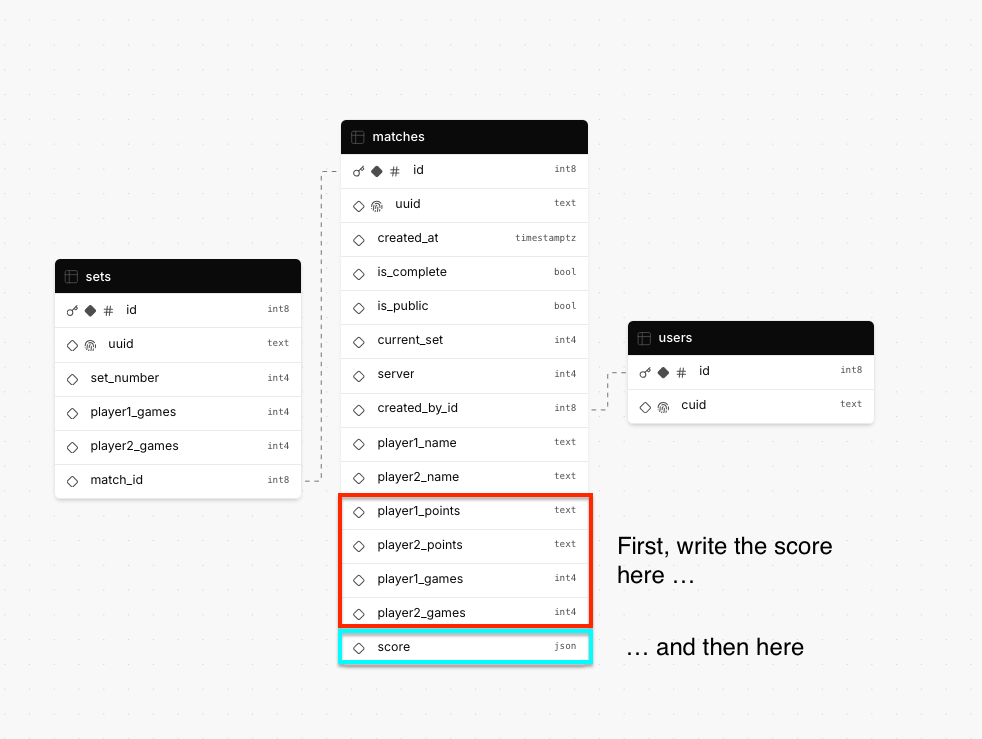
Database structure after adding the new score field
### **Step 2**: Migrate the existing matches data to the new format
For our new matches, we write to the new `score` field, but for existing matches, we don't. We need to "go back in time" and bring our old matches up to speed.

We need to write a migration script that will copy over the data from the **old format** to the **new format.**
How you write the migration script is up to you, but I'll write a custom endpoint that will execute some database logic. I did it like this:
```tsx
import { MigrateToNewSchemaApi } from "wasp/server/api";
import { Prisma } from "@prisma/client";
export const migrateToNewSchema: MigrateToNewSchemaApi = async (
_req,
res,
context
) => {
// 1. Get all the matches that have an empty score field
const matchesWithoutJsonScore = await context.entities.Match.findMany({
where: {
score: {
equals: Prisma.DbNull,
},
},
});
let updatedCount = 0;
for (let match of matchesWithoutJsonScore) {
// 2. Copy the data from the old format to the new format
await context.entities.Match.update({
where: { id: match.id },
data: {
score: {
player1: {
points: match.player1Points,
games: match.player1Games,
},
player2: {
points: match.player2Points,
games: match.player2Games,
},
},
},
});
updatedCount++;
}
return res.json({ success: true, updatedCount });
};
```
We deploy this code **without any other database changes** and we run the migration script. It should report the number of matches that were updated:
```json
{ "success": true, "updatedCount": 105 }
```
Now we have our database in a state where all the matches have the match score written in the new format.
### **Step 3:** Start reading from the new format
We are now ready to finish the migration by making the `score` field **required (not nullable).** Our app needs that field, so it's a bad practice keeping it optional - it's a bug waiting to happen.
We'll remove the `?` from the Prisma schema:
```diff
- score Json?
+ score Json
```
Running `wasp db migrate-dev` gives us this migration file:
```sql
/*
Warnings:
- Made the column `score` on table `Match` required. This step will fail if there are existing NULL values in that column.
*/
-- AlterTable
ALTER TABLE "Match" ALTER COLUMN "score" SET NOT NULL;
```
Notice the comment on top, it says the migration will fail if there are existing `NULL` values in the `score` column.
That's fine, we took care of that in our previous step when we filled in the `score` value for all matches. We also made sure that we wrote any score updates to both the old location and the new location for all new matches.
Now that we have the new format ready, we'll start **reading from the new format** so that our app stops depending on the old format in its entirety:
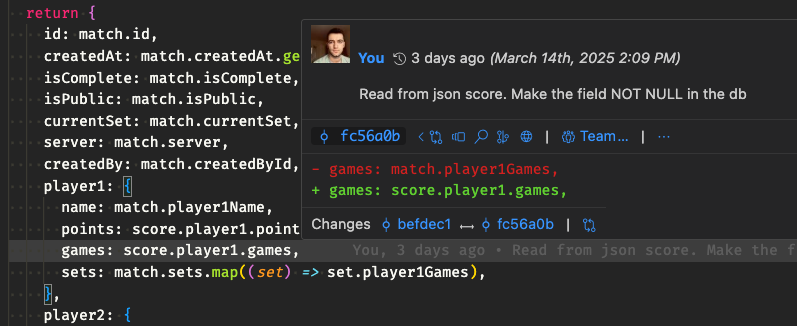
Database structure when reading from new format
This change looks like this:
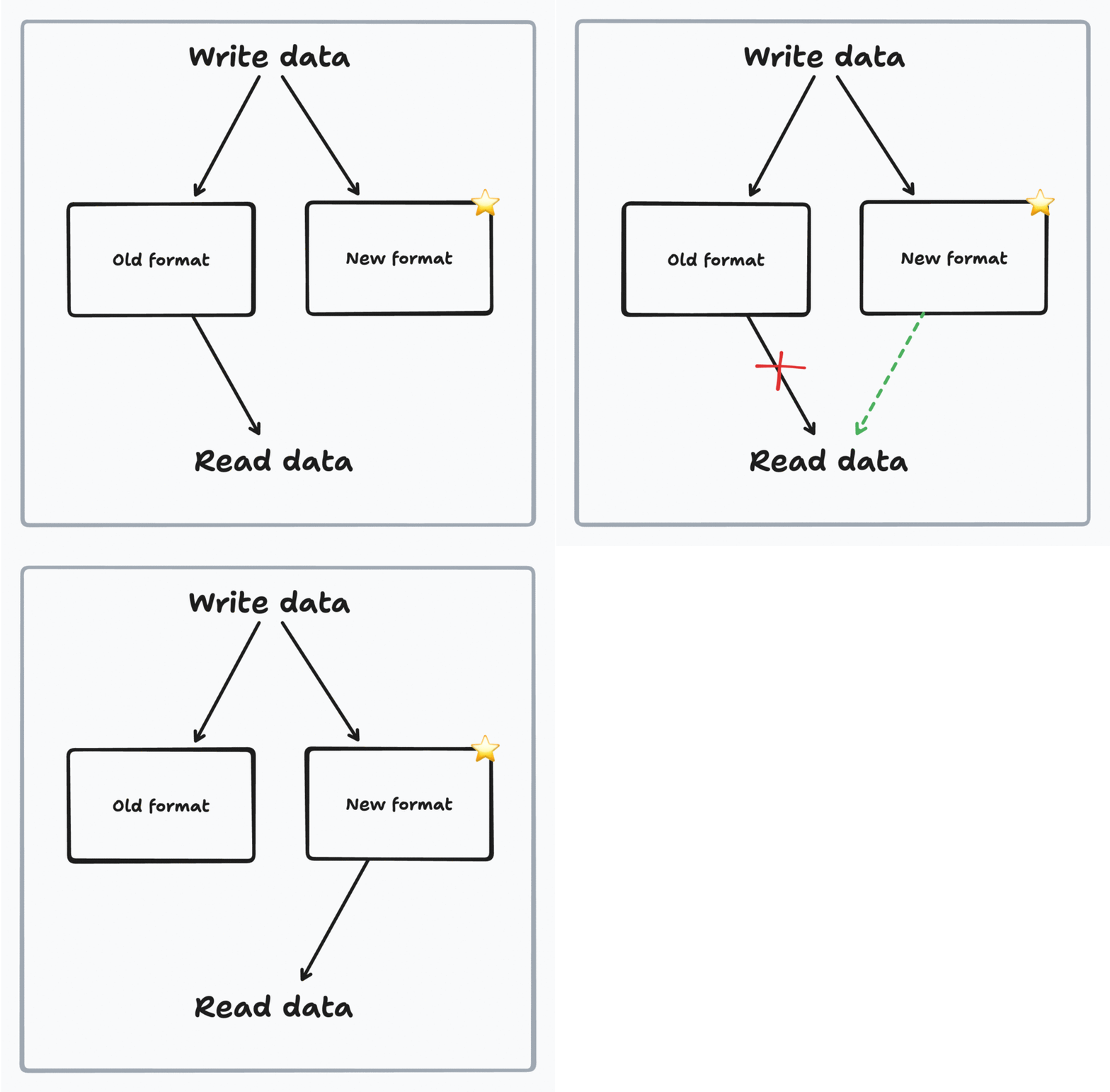
Step 2: Reading from new format
We stop reading from the old format, and start reading from the new format.
After we deploy this change, our app will only read from the new `score` field. Now we no longer depend on the old format, which sets up for the last step of the process.
### **Step 4**: Remove the old format fields
After we tested the app and we are certain that the app is no longer using the old fields anywhere, we can remove the old format fields.
We remove the fields from the Prisma schema and generate the migration file in `migrations/` dir:
```sql
/*
Warnings:
- You are about to drop the column `player1Games` on the `Match` table. All the data in the column will be lost.
- You are about to drop the column `player1Points` on the `Match` table. All the data in the column will be lost.
- You are about to drop the column `player2Games` on the `Match` table. All the data in the column will be lost.
- You are about to drop the column `player2Points` on the `Match` table. All the data in the column will be lost.
*/
-- AlterTable
ALTER TABLE "Match" DROP COLUMN "player1Games",
DROP COLUMN "player1Points",
DROP COLUMN "player2Games",
DROP COLUMN "player2Points";
```
There are some warnings in the migration file: all the data will be lost in the columns we want to remove. That's fine because we migrated the data from the old format to the new format. This is exactly what we want, to clean up the old redundant data.
Dropping the old fields looks like this:
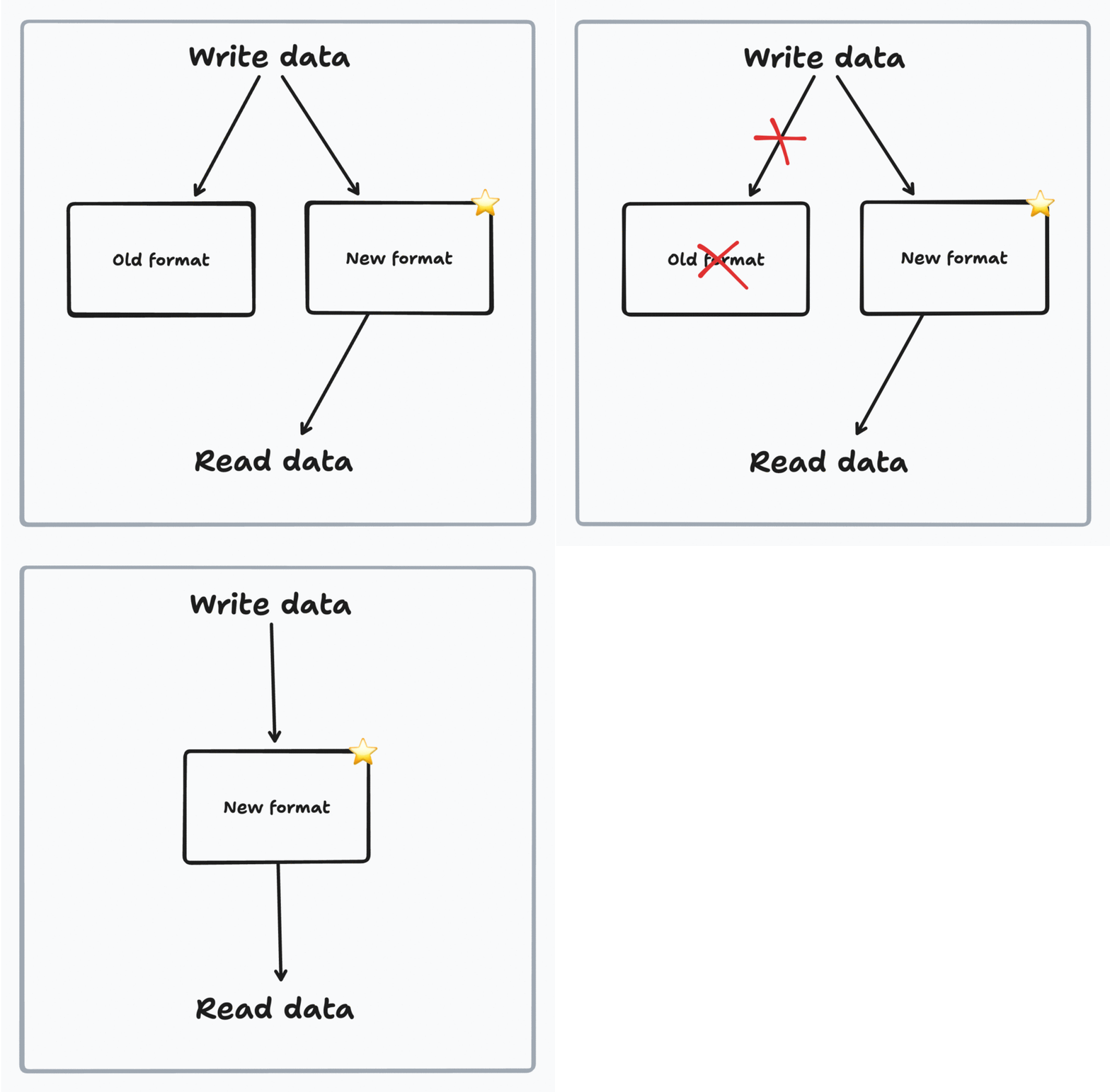
Step 3: Removing old fields
We no longer need the old fields, we remove them and all that's left is the new format fields.
Deploy the app one more time… and we completed the migration.
This is our final database schema:
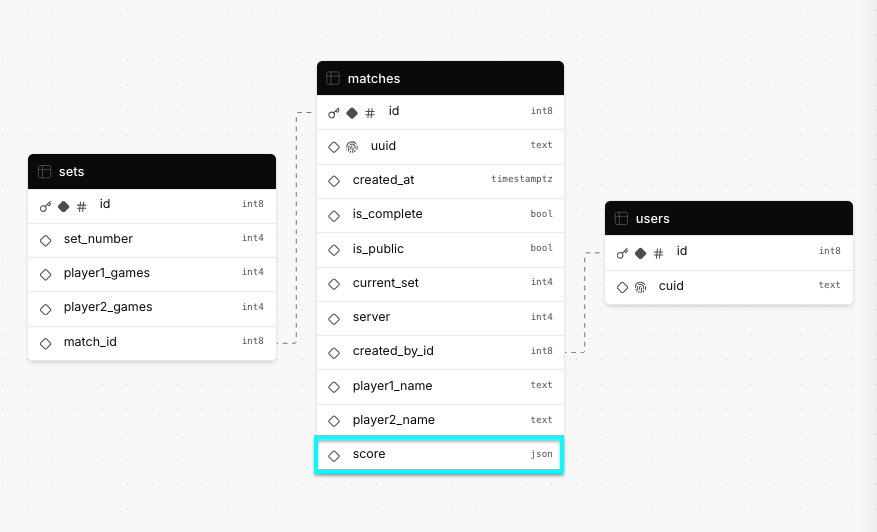
Final database structure after migration
Since we used Prisma for our database modeling, it was quite easy to see what was going on with the new fields, old fields, and the migration files that Prisma generated with the extra comments.
## Conclusion
In this article, we learned about three types of database migration scenarios:
1. working locally, **creating the first migration**, deploying
2. **adding new fields** to an already deployed application (default value is your friend)
3. **doing a breaking change** using the expand & contract strategy
Database migrations are a serious thing to do in the lifecycle of developing your app, especially when we have users who rely on your app. If you plan ahead, and pick the right strategy, your migration should have a good chance of success.
The most important tips to remember:
- Always do database changes through migrations (they keep local and production databases in sync)
- Make sure you have sensible default values for new fields (they enable easy addition of new fields)
- If you need to do a breaking change, use the expand and contract pattern to migrate your data in multiple steps (minimizes the chances you lose data)
- Back up your database (if something does go wrong, you can revert the change)
The source code of the final app can be found here: [github.com/wasp-lang/tennis-score-app](http://github.com/wasp-lang/tennis-score-app) and the deployed version here:
### Reading materials
Here are some extra reading materials on the topic:
-
-
-
**Tags:**
- [webdev](https://wasp.sh/blog/tags/webdev)
- [wasp](https://wasp.sh/blog/tags/wasp)
- [prisma](https://wasp.sh/blog/tags/prisma)
- [database](https://wasp.sh/blog/tags/database)
[Edit this page](https://github.com/wasp-lang/wasp/edit/release/web/blog/2025-04-02-an-introduction-to-database-migrations.mdx)Last updated on **Nov 4, 2026**